
What Are They Listening To (WATLT)
Have you ever wanted to play with your friends, and show them what are you listening to? It is possible with this mod!
You can see what other players listening to right now through Last.fm in Tab menu!

Or if someone doesn't have a Last.fm account (or they simply don't want to show their music), they can disable tracking.

As you already noticed, it even supports album covers, but not all songs on Last.fm have album covers... Though, you can add them yourself and contribute to Last.fm (I will not teach you how to do it sorry)
Usage
This mod uses Last.fm to fetch current song, so take your favorite music streaming app and pair it with any Last.fm scrobbler to start!
You will also need a Last.FM API key to communicate with API (which is obvious). Don't worry, you can get it easily here: https://www.last.fm/api/account/create (you don't need to fill callback URL btw, keep it empty)
So, now that you have an API key and server ready to start, simply start it with this mod, then fill API key in config file (.minecraft/config/watlt-common.toml) and restart server, you are now ready to use mod!
When player first join with this mod enabled, they will be prompted to enter their Last.fm username (NOT link), or deny tracking.
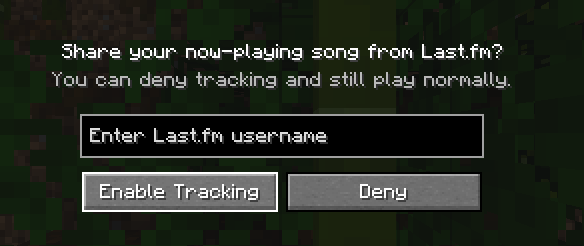
After that, they all set up and no more work needed! Easy, right?
Commands
There are several commands, but they are really simple
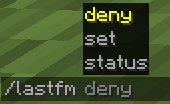
- /lastfm set - change your Last.fm username, or set it up, if you denied tracking on login
- /lastfm deny - deny tracking
- /lastfm status - debug, just debug
I guess that's all, have fun!
Spoilerand yes name inspired by mod What Are They Up To (WATUT) https://modrinth.com/mod/what-are-they-up-to
- Edition: Minecraft Java
- File type: .jar
- Minecraft versions listed: 1.20.1, 1.20.2, 1.20.3
- How to install: Install the matching mod loader (Forge, Fabric or NeoForge) for your Minecraft version. → Download the .jar. → Put it in the .minecraft/mods folder and launch that loader profile.
- Where to get it: Opens on Modrinth — not every file is mirrored on our own servers.
Install steps are the general flow for this file type — How to install Minecraft Java mods & modpacks walks through it step by step.
- Ships as watlt-1.1-forge.jar — drop this file into the mods folder
- Download size: 73 KB
- Download link checked 10 Sept 2026 — working
These come from our own check of the pack file, not from the source page.