
Time Crafting Table
A Vanilla+ mod that introduces a progressive, time-based crafting system with powerful speed and range upgrades.
⬇ Download on Modrinth
Time Crafting Table
Time Crafting Table is a Minecraft mod for NeoForge that overhauls the vanilla crafting mechanic. Instead of instant crafting, this mod introduces a time-based, background process, turning mundane crafting into a manageable, upgradeable, and server-friendly experience.
This mod is perfect for modpacks and servers that aim to add a layer of progression and realism to crafting without introducing complex industrial machinery.
🇷🇺 Readme in Russian / Читать на русском
Time Crafting Table — это мод для Minecraft (NeoForge), который полностью перерабатывает механику крафта. Вместо мгновенного создания предметов, мод вводит основанный на времени фоновый процесс, превращая рутинный крафт в управляемый, улучшаемый и дружелюбный к серверам опыт.
Этот мод идеально подходит для модпаков и серверов, которые стремятся добавить уровень прогрессии и реализма в крафт, не вводя при этом сложные промышленные машины.
Возможности
🕒 Крафт, основанный на времени
- Фоновый процесс: Крафт больше не мгновенный. Запустите создание предмета, и оно будет продолжаться в фоновом режиме, пока вы занимаетесь другими делами.
- Динамическое время крафта: Время, необходимое для каждого рецепта, рассчитывается на основе его сложности, глубины и редкости ингредиентов. Простая доска скрафтится быстро, а незеритовый блок потребует времени!
- Моментальный крафт для простых рецептов: Маленькие и простые рецепты (например, 2x2) можно настроить на мгновенное создание, убирая ненужное ожидание для базовых предметов.
🚀 Улучшаемый верстак
Стандартный верстак заменяется на Продвинутый Верстак, который можно улучшать с помощью специальных модулей:
- Улучшения скорости: Значительно сокращают время крафта. Пройдите путь от небольшого ускорения до почти мгновенного создания с четырьмя уникальными уровнями улучшений.
- Улучшения радиуса: Верстак работает, пока игрок находится в его радиусе действия. Увеличивайте этот радиус с нескольких блоков до огромной территории, что позволяет создавать общую, городскую автоматизацию крафта!
⚙️ Полная настраиваемость
Каждый аспект мода можно настроить под баланс вашего модпака или сервера:
- Все таймеры крафта, множители и параметры алгоритма.
- Мощность и рецепты каждого улучшения.
- Радиус работы верстака.
- И многое другое, всё через детально прокомментированный серверный конфигурационный файл.
🎮 Удобство для серверов и админов
/tct clearcache: Команда для админов, позволяющая безопасно очистить кэш времени рецептов мода без полной перезагрузки сервера (/reload)./tct calculate <предмет>: Команда для всех, позволяющая проверить расчетное время крафта для любого предмета, помогая игрокам и админам понять баланс.
🤝 Совместимость
- Поддержка JEI & EMI: Полная поддержка переноса рецептов из Just Enough Items (JEI) и EMI. Нажмите кнопку
+, чтобы автоматически переместить ингредиенты в Продвинутый Верстак.
Как это работает
- Поставьте в режиме выживания ванильный верстак или сборщик. Он автоматически превратится в Продвинутый Верстак.
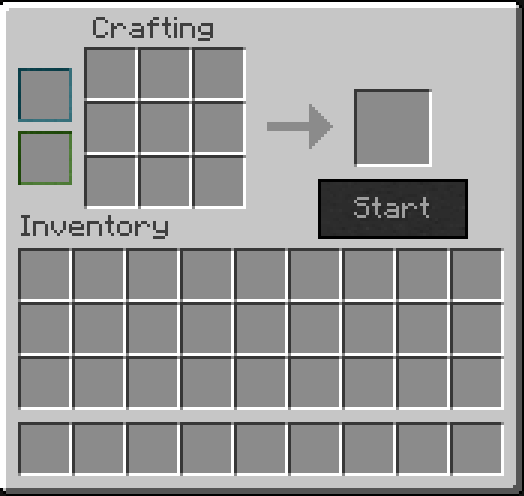
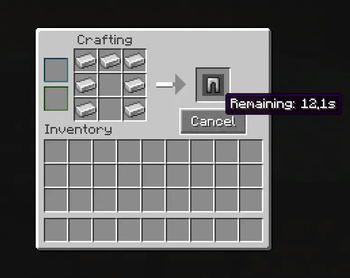
- Откройте интерфейс. Он знаком, но с новыми слотами для улучшений и полосой прогресса.
- Разместите ингредиенты, запустите крафт и занимайтесь своими делами! Верстак будет продолжать работать, пока вы (или кто-то другой) находитесь в пределах его улучшенного радиуса.
Установка
- Установите NeoForge для Minecraft 1.21.1.
- Скачайте последнюю версию Time Crafting Table.
- Поместите
.jarфайл в вашу папкуmods. - Наслаждайтесь!
Features (English)
🕒 Time-Based Crafting
- Background Process: Crafting is no longer instant. Start a craft, and it will continue in the background while you do other things.
- Dynamic Craft Time: The time required for each recipe is calculated based on its complexity, depth, and the rarity of its ingredients. A simple wooden plank is fast, but a Netherite block will take time!
- Instant Crafting for Simple Recipes: Small, simple recipes (like 2x2 crafts) can be configured to craft instantly, removing unnecessary waiting for basic items.
🚀 Upgradeable Workbench
The standard crafting table is replaced by the Advanced Workbench, which can be upgraded with special modules:
- Speed Upgrades: Drastically reduce crafting times. Progress from a slight boost to near-instantaneous crafting with four unique tiers of upgrades.
- Range Upgrades: The workbench operates as long as a player is within its range. Increase this operational radius from a few blocks to a massive area, allowing for shared, town-wide crafting automation!
⚙️ Fully Configurable
Every aspect of the mod can be tweaked to fit your modpack or server's balance:
- All craft times, multipliers, and algorithm parameters.
- The power and recipes of each upgrade.
- The range of operation for the workbench.
- And much more, all via a detailed server-side configuration file.
🎮 Server & Admin Friendly
/tct clearcache: A command for admins to safely clear the mod's recipe time cache without a full server/reload./tct calculate <item>: A command for anyone to check the calculated craft time for any item, helping players and admins understand the balance.
🤝 Compatibility
- JEI & EMI Support: Full support for recipe transfer from Just Enough Items (JEI) and EMI. Click the
+button to move ingredients directly into the Advanced Workbench.
How It Works
- Place down a vanilla Crafting Table or Crafter in Survival mode. It will automatically convert into an Advanced Workbench.
- Open the UI. It's familiar, but with new slots for upgrades and a progress bar.
- Place your ingredients, start the craft, and go about your business! The workbench will continue working as long as you (or anyone else) are within its upgraded range.
Installation
- Install NeoForge for Minecraft 1.21.1.
- Download the latest version of Time Crafting Table.
- Place the
.jarfile into yourmodsfolder. - Enjoy!
For Modpack Creators & Server Admins
All configuration is located in the serverconfig folder within your world or server directory. The file timecraftingtable-server.toml is heavily commented to explain what each option does. The mod is designed to be highly configurable to fit any balance you desire.
License
This mod is licensed under the GNU General Public License v3.0. You are free to use it in your modpacks.
- Edition: Minecraft Java
- File type: .jar
- Minecraft version listed: 1.21.1
- How to install: Install the matching mod loader (Forge, Fabric or NeoForge) for your Minecraft version. → Download the .jar. → Put it in the .minecraft/mods folder and launch that loader profile.
- Where to get it: Opens on Modrinth — not every file is mirrored on our own servers.
Install steps are the general flow for this file type — How to install Minecraft Java mods & modpacks walks through it step by step.
- Ships as timecraftingtable-1.1.0.jar — drop this file into the mods folder
- Download size: 8.9 MB
- Download link checked 21 Aug 2026 — working
These come from our own check of the pack file, not from the source page.