
sort-block-mod
Based on the items with labels within the area, the items are automatically collected and sorted into boxes with display signs.
⬇ Download on Modrinth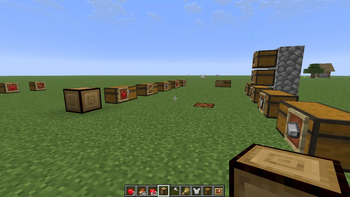
📦 User Manual
Introduction
Item Collection and Classification Device. It not only automatically picks up items dropped above it but also intelligently distributes items to corresponding chests by scanning surrounding containers.
Its most significant feature is support for "visual classification": you only need to mark chests with item frames or signs, and the machine will automatically understand your classification intent.
🛠️ Quick Start
Version Description (Java Edition)
Designed based on Minecraft version 1.21.11, using Fabric API.
- Place the Machine: Place the Smart Archival Unit on the ground.
- Arrange Storage Area: Place chest containers around the machine (the support range is indicated by border line effects).
- Mark Chests: Use item frames or signs attached to the chests to define their purpose (see "Classification Rules").
- Input Items: Drop items directly above the machine. The machine will generate particle beams to transport the items to the target chest.
📋 Classification Rules & Priority
The machine attempts to store items according to Priority, from highest to lowest.
🥇 Priority 1: Tag Filter (Filter Chest)
- How to Set: Attach an item frame to a chest and place a specific item (e.g., an Apple) inside the frame.
- Logic: The machine checks if the dropped item matches the item in the frame.
- ✅ Yes: The item is stored in this chest.
- ❌ No: Skip and look for the next chest.
- Purpose: Used for storing large quantities of specific resources (e.g., ores, crops).
🥈 Priority 2: Auto-Learning Unit (Auto-Learning Chest)
- How to Set: Attach an empty item frame to a chest.
- Logic:
- The machine detects that the item frame is empty.
- The machine stores the currently processed item (e.g., Oak Log) into the chest.
- ✨ Auto-Tagging: The machine automatically takes one Oak Log from the chest and places it in the item frame.
- Result: This chest is now upgraded to Priority 1 (Dedicated Filter) and will exclusively receive Oak Logs from now on.
- Purpose: Eliminates the need to manually set filters; allows the system to automatically establish classification based on incoming items.
🥉 Priority 3: Sundries/Overflow Chest (Dump Chest)
- How to Set: Attach a sign to a chest and write
Sundrieson any line of the sign (case-insensitive). - Logic: Ignores item type; accepts anything as long as the chest isn't full.
- Purpose:
- Stores miscellaneous items that don't fall into other categories.
📏 Parameters
- Effective Operating Range:
- Centered on the machine.
- X-axis (East-West): 30 blocks
- Y-axis (Vertical): 5 blocks
- Z-axis (North-South): 8 blocks
- Configurable
Item Classification System Documentation
Divides items in Minecraft into multiple logical categories. Each category is identified by a representative item and defined by Tags, Hardcoded Sets, and Custom Matching Logic that determine which items belong to it. Categories are used for item filtering, organization, or other functions.
Category Overview
| Category | Representative Item | Description |
|---|---|---|
| Farming & Plants | Wheat | Crops, seeds, saplings, flowers, leaves, etc. |
| Food | Apple | All edible items (with specific exclusions) |
| Minerals & Resources | Iron Ingot | Ores, ingots, raw ores, ore blocks, nuggets, etc. |
| Equipment & Armor | Iron Chestplate | Armor and trimmable equipment |
| Tools | Iron Axe | Tools, weapons, arrows, buckets, etc. |
| Building Materials | Cobblestone | Various building blocks (stone, wood, glass, etc.) |
| Transportation | Minecart | Minecarts, rails, boats, and related items |
| Redstone | Redstone | Redstone components and redstone ore |
| Monster Drops | Rotten Flesh | Monster drops (including leather, feathers, etc.) |
| Woodwork/Furniture | Oak Log | Wooden decorations, workstations, furniture, etc. |
| Magic | Glass Bottle | Magic-related items (potions, enchanting, brewing, etc.) |
Detailed Category Descriptions
1. Farming & Plants
Representative Item: Wheat
Associated Tags:
c:cropsc:seedsvillager_plantable_seedssaplingsflowersleaveswart_blocksc:dyes
Extra Matched Items (Hardcoded Set FARMING_MISC):
- Bone Meal
- Lily Pad
- Moss Block
- Moss Carpet
- Honeycomb
- Honeycomb Block
- Beehive
- Bee Nest
2. Food
Representative Item: Apple
Associated Tags:
c:foodsfishes
Excluded Items (Blacklist):
- Rotten Flesh
- Spider Eye
- Pufferfish
- Poisonous Potato
Extra Matched Items (FOOD_MISC + all items with the food component):
- Egg
- Sugar
- Cake
3. Minerals & Resources
Representative Item: Iron Ingot
Associated Tags:
c:ingotsc:raw_materialsc:oresc:storage_blocksc:nuggetsbeacon_payment_itemscoal_oresredstone_oreslapis_oresdiamond_oresgold_oresiron_orescopper_ores
Extra Matched Items (MINERAL_MISC):
- Flint
- Ink Sac
- Glow Ink Sac
- Amethyst Shard
- Quartz
- Nether Quartz Ore
4. Equipment & Armor
Representative Item: Iron Chestplate
Associated Tags:
trimmable_armorhead_armorchest_armorleg_armorfoot_armor
No extra hardcoded items (covered by tags).
5. Tools
Representative Item: Iron Axe
Associated Tags:
axeshoespickaxesshovelsswordsarrows
Extra Matched Items (TOOL_MISC):
- Shears
- Flint and Steel
- Fishing Rod
- Name Tag
- Lead
- Bundle
- Shield
- Bow
- Crossbow
- Trident
- Arrow
- Spectral Arrow
- Tipped Arrow
- Mace
- Wind Charge
- Bucket
- Water Bucket
- Lava Bucket
- Milk Bucket
- Powder Snow Bucket
- Axolotl Bucket
- Tadpole Bucket
6. Building Materials
Representative Item: Cobblestone
Associated Tags:
stone_brickswoolwool_carpetslogsplanksstairsslabswallsfencesfence_gatesterracottadirtsandcandlesbedsc:glass_blocksc:glass_panes
Hardcoded Set STONE_VARIANTS (All stone-type variants):
- Stone
- Granite
- Polished Granite
- Diorite
- Polished Diorite
- Andesite
- Polished Andesite
- Deepslate
- Cobbled Deepslate
- Polished Deepslate
- Tuff
- Calcite
- Basalt
- Polished Basalt
- Smooth Basalt
- Netherrack
- Blackstone
- Polished Blackstone
- Gilded Blackstone
- Dripstone Block
- Pointed Dripstone
- Amethyst Block
- Amethyst Cluster
- Smooth Stone
- Soul Sand
- Nether Bricks
- Mossy Cobblestone
- Ice
- Packed Ice
- Blue Ice
- End Stone
- Shroomlight
- Gravel
- Soul Soil
- Cobblestone
- Stone Bricks
- Mossy Stone Bricks
- Cracked Stone Bricks
- Chiseled Stone Bricks
- Deepslate Bricks
- Cracked Deepslate Bricks
- Deepslate Tiles
- Cracked Deepslate Tiles
- Chiseled Deepslate
- Polished Blackstone Bricks
- Cracked Polished Blackstone Bricks
- Chiseled Polished Blackstone
- Red Nether Bricks
- End Stone Bricks
Extra Fixed Items:
- Bricks
- Brick Stairs
- Brick Slab
7. Transportation
Representative Item: Minecart
Associated Tags:
railsboatschest_boatsc:minecarts
Extra Matched Items (TRANSPORT_MISC, includes ANIMAL_EQUIPMENT + the following):
- Saddle
- Leather Horse Armor
- Iron Horse Armor
- Golden Horse Armor
- Diamond Horse Armor
- Wolf Armor
- Copper Horse Armor
- Netherite Horse Armor
- Carrot on a Stick
- Warped Fungus on a Stick
- Elytra
- Leather
8. Redstone
Representative Item: Redstone
Associated Tags:
redstone_oresbuttonsdoorstrapdoorsc:dusts
Hardcoded Set REDSTONE_COMPONENTS:
- Repeater
- Comparator
- Observer
- Dropper
- Dispenser
- Hopper
- Piston
- Sticky Piston
- Redstone Block
- Redstone Torch
- Target
- Lever
- Lightning Rod
- Daylight Detector
- Sculk Sensor
- Calibrated Sculk Sensor
- Tripwire Hook
- Lectern
- Stone Pressure Plate
- Oak Pressure Plate
- Spruce Pressure Plate
- Birch Pressure Plate
- Jungle Pressure Plate
- Acacia Pressure Plate
- Dark Oak Pressure Plate
- Mangrove Pressure Plate
- Cherry Pressure Plate
- Bamboo Pressure Plate
- Crimson Pressure Plate
- Warped Pressure Plate
- Polished Blackstone Pressure Plate
- Heavy Weighted Pressure Plate
- Light Weighted Pressure Plate
- Stone Button
- Oak Button
- Spruce Button
- Birch Button
- Jungle Button
- Acacia Button
- Dark Oak Button
- Mangrove Button
- Cherry Button
- Bamboo Button
- Crimson Button
- Warped Button
- Polished Blackstone Button
- Redstone Lamp
- Note Block
- Trapped Chest
- Powered Rail
- Detector Rail
- Activator Rail
- Redstone Ore
- Deepslate Redstone Ore
9. Monster Drops
Representative Item: Rotten Flesh
Associated Tags:
c:bonesc:rotten_fleshc:slimeballsc:stringsc:spider_eyesc:gunpowderc:ender_pearlsc:blaze_rodsc:ghast_tearsc:feathersc:leather
Extra Matched Items (MOB_DROPS_MISC):
- Rabbit Hide
- Snowball
10. Woodwork/Furniture
Representative Item: Oak Log
Associated Tags:
c:chestssignshanging_signs
Hardcoded Set WOOD_MISC_ITEMS:
- Campfire
- Soul Campfire
- Ladder
- Torch
- Soul Torch
- Lantern
- Soul Lantern
- Item Frame
- Glow Item Frame
- Painting
- Armor Stand
- Bowl
- Stick
- Paper
- Book
- Writable Book
- Written Book
- Flower Pot
- Composter
- Barrel
- Crafting Table
- Chest
- Scaffolding
- Loom
- Cartography Table
- Fletching Table
- Smithing Table
- Grindstone
- Beehive
- Bookshelf
11. Magic
Representative Item: Glass Bottle
Associated Tags: None (handled by extra matchers)
Extra Matched Items (MAGIC_MISC):
- Enchanted Book
- Experience Bottle
- Lapis Lazuli
- Brewing Stand
- Cauldron
- Crying Obsidian
- Ender Eye
- Potion
- Splash Potion
- Lingering Potion
Matching Logic Explanation
For a given filter item (representative) and an item to check, the system determines a match in the following order:
- If the items are identical → Match.
- If the representative item has no corresponding category → No Match.
- If the item to check is in the representative category's exclusion list → No Match.
- If the item to check has any tag associated with the category → Match.
- If the item to check is in the category's hardcoded set → Match.
- If the category's extra matcher returns
true→ Match. - Otherwise → No Match.
This design ensures flexibility and extensibility of the categories, leveraging the vanilla tag system while supplementing items not covered by tags through hardcoded sets and custom logic.
Document Last Updated: March 11, 2026
- Edition: Minecraft Java
- File type: .jar
- Minecraft version listed: 1.21.11
- How to install: Install the matching mod loader (Forge, Fabric or NeoForge) for your Minecraft version. → Download the .jar. → Put it in the .minecraft/mods folder and launch that loader profile.
- Where to get it: Opens on Modrinth — not every file is mirrored on our own servers.
Install steps are the general flow for this file type — How to install Minecraft Java mods & modpacks walks through it step by step.
- Ships as sort-block-mod-1.0.16.jar — drop this file into the mods folder
- Download size: 60 KB
- Download link checked 20 Aug 2026 — working
These come from our own check of the pack file, not from the source page.