
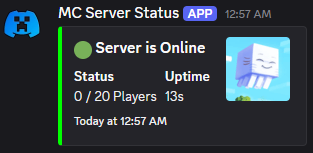


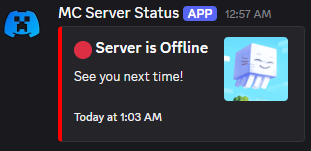
An over-engineered Discord status bot for your Minecraft server.
Note: It's server-side only.
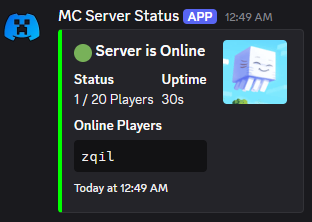
Features:
Obsessively Configurable: Almost every piece of text and styling in the Discord embed can be changed in the config file.
Real-Time Updates: The status message updates automatically when players join or leave.
Dynamic Bot Activity: The bot's "Playing" status can show the current player count, with custom messages for when the server is empty or full.
Data-Rich Fields: Optionally display TPS, server uptime, IP address, and a clean, formatted list of online players.
Smart & Reliable:
If the status message is accidentally deleted, the bot will automatically create a new one.
Includes connection retries in case Discord has a momentary hiccup during server startup.
Survives a Ctrl+C, making sure to send a status update as its last breath. WILL NOT SURVIVE A TERMINAL CLOSE!
Easy Management: A simple in-game command (/discordstatus update) lets you reload the config on the fly without restarting the server.
Server Icon Support: Automatically use your server-icon.png as the thumbnail for the embed.
Setup Guide:
Create a Discord Bot: Go to the Discord Developer Portal, create a new Application, and add a Bot to it. You'll need its Token.
Invite Your Bot: In the "OAuth2" -> "URL Generator" section, select the
botscope, then grant itSend Messages,Manage Messages, andRead Message Historypermissions. Copy the generated URL and use it to invite the bot to your server.Get Your Channel ID: Right-click the channel where you want the status message to live and click "Copy Channel ID". (You may need to enable Developer Mode in your Discord settings).
Install & Configure:
- Drop the mod's
.jarfile into your server'smodsfolder. - Start the server once to generate the default config file. It will print an error and stop, which is normal.
- Open
config/discord_status/discord_status.json. - Paste your Bot Token and Channel ID into the
botTokenandchannelIdfields. - Restart the server. The bot will connect and post its first message!
- Drop the mod's
- Edition: Minecraft Java
- File type: .jar
- Minecraft version listed: 1.21.6
- How to install: Install the matching mod loader (Forge, Fabric or NeoForge) for your Minecraft version. → Download the .jar. → Put it in the .minecraft/mods folder and launch that loader profile.
- Where to get it: Opens on Modrinth — not every file is mirrored on our own servers.
Install steps are the general flow for this file type — How to install Minecraft Java mods & modpacks walks through it step by step.
- Ships as discordstatus-1.1.0.jar — drop this file into the mods folder
- Download size: 17.9 MB
- Download link checked 21 Aug 2026 — working
These come from our own check of the pack file, not from the source page.