
Item Discovery
Java mod listed for Minecraft 1.21. Downloads from the MC Java Mods app on Android.
A small mod which lets survival players name all items whatever they want without imposing any pre-existing names.
⬇ Download on Modrinth

Item Discovery forces all items and blocks to be displayed as "Unkown Item/Block" in the inventory when in survival mode.

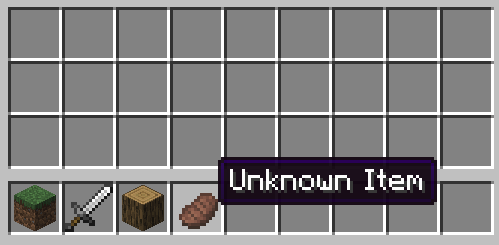
If an item is unknown, right-clicking it will bring up the renaming screen
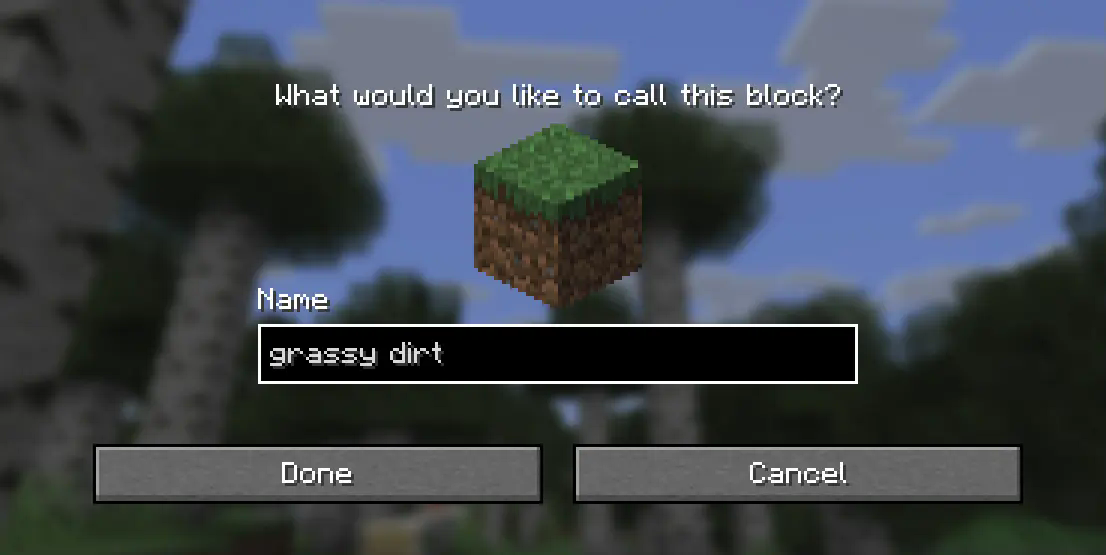 Which allows you to name the item whatever you want.

(Names are also automatically formatted to match Minecraft's typical "Title Case")
A keybind is also available (K by default), to bring up this menu for the currently held item at any time if you wish to change the name later. Assigned names are global across all items of that type but can be overridden with an anvil like usual.
Names are stored per-world, per-player and are not visible in creative or spectator mode.
- Edition: Minecraft Java
- File type: .jar
- Minecraft version listed: 1.21.8
- How to install: Install the matching mod loader (Forge, Fabric or NeoForge) for your Minecraft version. → Download the .jar. → Put it in the .minecraft/mods folder and launch that loader profile.
- Where to get it: Opens on Modrinth — not every file is mirrored on our own servers.
Install steps are the general flow for this file type — How to install Minecraft Java mods & modpacks walks through it step by step.
- Ships as itemdiscovery-1.0.1.jar — drop this file into the mods folder
- Download size: 33 KB
- Download link checked 21 Oct 2026 — working
These come from our own check of the pack file, not from the source page.