
Fabis Chatfilter
ChatFilter organizes your Minecraft chat into custom, rule-based tabs. Sort messages by sender, content, or origin to keep your chat clean, organized, and…
⬇ Download on Modrinth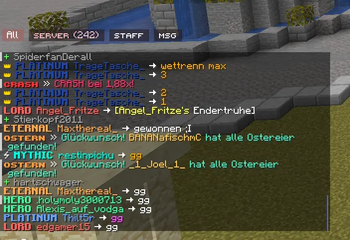
My ChatFilter automatically organizes incoming messages into dedicated tabs (e.g., Server, Private, Staff) instead of cluttering the default chat. Messages are saved in their respective tab histories and can be customized using specific filtering rules.
Key Features
- Multiple Chat Tabs: Create custom tabs with individual rule sets.
- Filter Types:
- CONTAINS: Matches specific keywords.
- STARTS WITH: Matches messages beginning with specific text.
- SENDER: Filters based on the player's name.
- REGEX: Advanced filtering using regular expressions.
- ORIGIN: Filter by source (Player / Private / Server).
- Unread Indicators: Notification counters for each tab.
Customization:
Set unique tab colors. Toggle tab-specific notifications (disabled by default). Flexible UI: Position tabs at the top or bottom; align them left, center, or right. Profile Management: Save, load, import, and export your configurations.
Quick Start Guide:
F10 Opens the settings menu.
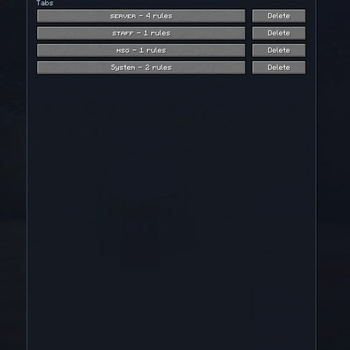
Tab Menu: Edit rules individually for each tab. Navigation: Simply click a tab to switch views.
Rearrange: Right-click and drag the tab bar to move it horizontally.
Configuration & Profiles On Windows, you can find your exported profiles and settings in the Minecraft config folder:
%APPDATA%\.minecraft\config\chatfilter_mailboxes_export.json
%APPDATA%\.minecraft\config\chatfilter_profile_export.json
Individual profile files are stored in:
%APPDATA%\.minecraft\config\chatfilter_profiles\
- Edition: Minecraft Java
- File type: .jar
- Minecraft version listed: 1.21.11
- How to install: Install the matching mod loader (Forge, Fabric or NeoForge) for your Minecraft version. → Download the .jar. → Put it in the .minecraft/mods folder and launch that loader profile.
- Where to get it: Opens on Modrinth — not every file is mirrored on our own servers.
Install steps are the general flow for this file type — How to install Minecraft Java mods & modpacks walks through it step by step.
- Ships as chatfilter-1.0.1.jar — drop this file into the mods folder
- Download size: 94 KB
- Download link checked 11 Sept 2026 — working
These come from our own check of the pack file, not from the source page.