
Weather Overhaul
This mod introduces a dynamic cycle of Spring, Summer, Autumn, and Winter to the game, altering foliage, weather, and block behaviors over time.
⬇ Download on Modrinth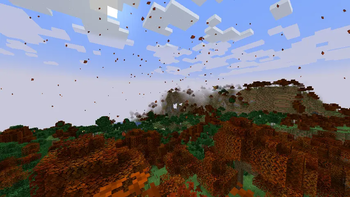
Seasons and Weather Overhaul
A Minecraft Forge Mod for 1.20.1
Four seasons. Real effects. Every world feels alive.
Overview
Seasons and Weather Overhaul adds a full four-season cycle to Minecraft that actually affects how you play. Crops behave differently, water freezes, snow blankets the ground, the sky shifts in color, and particles drift through the air - all tied directly to in-game time.
Features
🌸 Spring
- Cherry blossoms drift through the air
- Ice and snow from Winter melt away
- Crops return to normal growth speed
- Sky takes on a soft green tint
☀️ Summer
- Crops grow faster than usual
- Sky brightens with a warm blue hue
- The world is at its most lush
🍂 Autumn
- Custom Orange and red leaves drift down around you
- Leaf blocks on all trees change color - oak, birch, jungle, acacia, dark oak
- Crops slow down significantly
- Sky warms to an amber tint
❄️ Winter
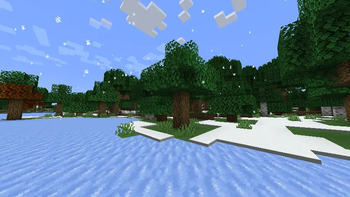
- Snow layers accumulate on the ground around you as you move
- Water surfaces freeze to packed ice
- Crops stop growing entirely
- Snowflakes fall in the open air
- Sky shifts to a cold blue tone
Season Transitions
When a season changes you'll see a colored announcement in chat:
- Spring has arrived!
- Summer has arrived!
- Autumn has arrived!
- Winter has arrived!
HUD
The current season is displayed in the top-left corner of your screen at all times. Can be toggled off in the config.
Configuration
After loading the mod once, a config file is generated at:
saves/<worldname>/serverconfig/seasonsmod-common.toml
Here you can change things like the length of seasons, wether the water should freeze or not and the visibility of the HUD.
Requirements:
- Minecraft 1.20.1
- Forge 47.x
- Java 17
Compatibility
- Works in both singleplayer and multiplayer
- Season state is saved per world and persists across sessions
- In multiplayer, the season is synced from server to all connected clients automatically
Credits
Built from scratch using Minecraft Forge MDK 1.20.1.
- Edition: Minecraft Java
- File type: .jar
- Minecraft versions listed: 1.20.1, 1.20.2, 1.20.3
- How to install: Install the matching mod loader (Forge, Fabric or NeoForge) for your Minecraft version. → Download the .jar. → Put it in the .minecraft/mods folder and launch that loader profile.
- Where to get it: Opens on Modrinth — not every file is mirrored on our own servers.
Install steps are the general flow for this file type — How to install Minecraft Java mods & modpacks walks through it step by step.
- Ships as seasonsmod-1.0.0.jar — drop this file into the mods folder
- Download size: 30 KB
- Download link checked 20 Aug 2026 — working
These come from our own check of the pack file, not from the source page.