
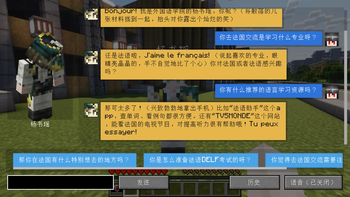
Mamizou - A NeoForge Mod for Creating NPCs Powered by LLM
Usage
- Right-click an NPC while holding Mamizou’s Leaf to create or edit it.
- Supports both OpenAI-compatible APIs and the Coze API.
- NPC skins can be set using:
- A player's name,
- A pre-stored skin file located at
./config/mamizou/skins/<example>.png(enter<example>.pngas the reference), or - A URL.
- Right-click an NPC to begin a conversation.
Notes
- Custom in-game prompts are not supported when using Coze API.
- The task system and voice input features are still under development.
- Retrieving skins by player name could experience significant delays and poor performance in Mainland China.
- The plugin is now designed for NeoForge 1.21.1.
Quick facts
- Edition: Minecraft Java
- File type: .jar
- Minecraft version listed: 1.21.1
- How to install: Install the matching mod loader (Forge, Fabric or NeoForge) for your Minecraft version. → Download the .jar. → Put it in the .minecraft/mods folder and launch that loader profile.
- Where to get it: Opens on Modrinth — not every file is mirrored on our own servers.
Install steps are the general flow for this file type — How to install Minecraft Java mods & modpacks walks through it step by step.
Verified by MCModsHub
- Ships as mamizou-1.21.1-0.1.1.jar — drop this file into the mods folder
- Download size: 356 KB
- Download link checked 21 Aug 2026 — working
These come from our own check of the pack file, not from the source page.