
ModsJava
AI Tooltip
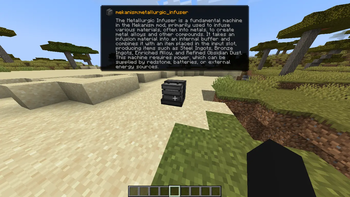
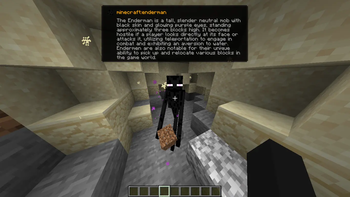
An intelligent AI-powered HUD tooltip that uses Gemini 2.5 Flash to instantly describe any block or entity you look at!
⬇ Download on Modrinth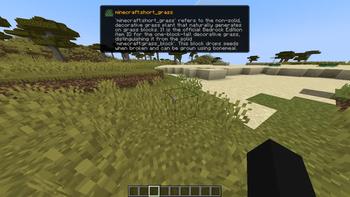
AI Tooltip
AI Tooltip is a simple, polished client-side mod for NeoForge 1.21.1 that integrates Google's Gemini 2.5 Flash AI directly into your Minecraft HUD!
Ever look at a strange modded block or entity and wonder what it does? Now you can just press a keybind!
Features
- Smart Descriptions: Uses Gemini 2.5 Flash to generate a factual, 2-3 sentence description of any Block or Entity you are looking at.
- Google Web Search Grounding: The AI isn't just guessing; if you enable it, the AI browses the live web to find accurate, up-to-date documentation on obscure modded items before it answers you!
- Native Tooltip UI: Renders a gorgeous, native-looking tooltip right below your crosshair. It even pulls the exact Item Icon and Mod ID of the block or entity!
- Hold ALT to Expand: The tooltip defaults to a single, compact summary line so it doesn't clutter your screen. Hold the
ALTkey to instantly expand the box and read the full paragraph. - Optimized & Cached: It only queries the API once per unique block/entity and caches the response in memory, meaning you won't burn through your API quota looking at the same chest twice.
How to Use
- Install the Mod: Drop
aitooltipinto yourmodsfolder. - Launch Minecraft: Launch the game at least once so the mod can generate its configuration file.
- Configure your API Key:
- Go to your Minecraft folder and open
config/aitooltip_config.json. - Get a free API key from Google AI Studio (https://aistudio.google.com/).
- Replace
"PUT_YOUR_GEMINI_KEY_HERE"with your actual key and save the file.
- Go to your Minecraft folder and open
- Toggle the HUD In-Game:
- Join a world or server.
- Press
M(by default, can be changed in Options > Controls) to toggle the AI Tooltip HUD on or off. - Look at something!
Configuration (config/aitooltip_config.json)
{
  "geminiApiKey": "YOUR_KEY_HERE",
  "useWebSearch": true
}
geminiApiKey: Your Google Gemini API key.useWebSearch: Set totrue(default) to allow the AI to browse the internet for better answers on modded content. Set tofalseif you want slightly faster, but potentially less accurate, responses.
Credits
Made by arthurus36.
Quick facts
- Edition: Minecraft Java
- File type: .jar
- Minecraft version listed: 1.21.11
- How to install: Install the matching mod loader (Forge, Fabric or NeoForge) for your Minecraft version. → Download the .jar. → Put it in the .minecraft/mods folder and launch that loader profile.
- Where to get it: Opens on Modrinth — not every file is mirrored on our own servers.
Install steps are the general flow for this file type — How to install Minecraft Java mods & modpacks walks through it step by step.
Verified by MCModsHub
- Ships as aitooltip-1.0.3-fabric.jar — drop this file into the mods folder
- Download size: 2.9 MB
- Download link checked 10 Sept 2026 — working
These come from our own check of the pack file, not from the source page.