
Immersive Tools
Stop!
Stop replacing your tools. Start evolving them. A non-destructive, upgrade system for your vanilla equipment WITH TIERS.
The Mod
Ever crafted that perfect Netherite pickaxe, fully enchanted, only to feel like the progression has stopped?
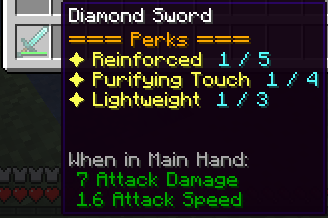
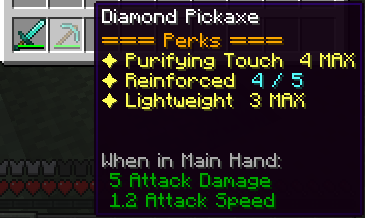
Immersive Tools is an end-game expansion mod that introduces a deep, non-destructive Perk System for your tools and weapons. Instead of crafting new items, you apply permanent enhancements to the gear you already love, upgrading them through multiple tiers of power.
How It Works
The system is simple to use but designed for a long-term survival world.
Step 1: Apply the Perk (Tier 1)
- Craft a specific Perk Gem (such as the
Lightweight Gem,Void Gem, etc.). - Hold your tool in your main hand and the Gem in your off-hand.
- Right-click to permanently apply the Tier 1 Perk to that item.
Step 2: Upgrade the Tiers (Tier 2-5)
- To evolve your Perks, you must craft powerful, universal Essences.
- Start by crafting the
Refined Essence(Tier 2 Upgrade). - Hold your tool (which already has a T1 Perk) and the Essence in your off-hand.
- Right-click to upgrade all eligible Perks on that item to the next Tier!
- Continue this process with
Pure Essence(T3),Legendary Essence(T4), and finally theDivine Essence(T5) for ultimate power.
Perks Included (Release 1.0)
This initial release includes three essential Perks:
- Light Weight: (Catalyst:
Lightweight Gem)- Increases your mining and attack speed when holding the tool.
- Reinforced Preservation: (Catalyst:
Reinforced Gem)- Grants a chance to not consume durability when using the tool in combat or breaking blocks.
- Purifying Touch: (Catalyst:
Blaze Gem)- Has a chance to automatically smelt block drops (e.g., Iron Ore -> Iron Ingot).
- Has a chance to apply a Fire Aspect effect to enemies in combat.
- Void Leap: (Catalyst:
Void Gem)- If you hold shift and right click with the tool on your hand, you jump in the direction you are facing.
- The tier acts as a multiplier, meaning tier 5 will make you jump double the size of tier 1.
Crafting Your Legend
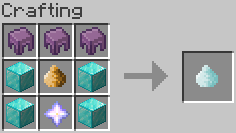
The path to power is designed for the end-game. These upgrades are expensive, requiring you to master all dimensions—from Nether Stars to End City loot.
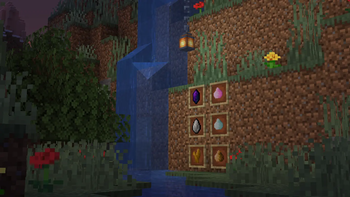
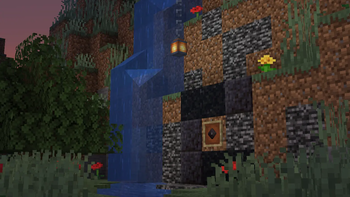
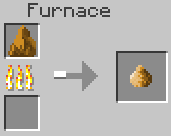
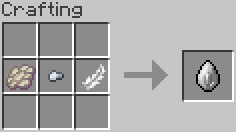
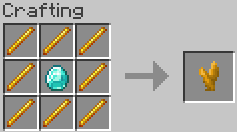
Check out the image gallery to see the crafting recipes for the three starting Gems and the powerful Refined, Pure, and Legendary Essences!
Future Plans
- More creative Perks are already in development (Magnetic Pull, Repulsion Strike, and more)!
Feedback && Support
- If you want to give ideias or report problems, checkout our github repository and open an issue!
- Edition: Minecraft Java
- File type: .jar
- Minecraft version listed: 1.16.5
- How to install: Install the matching mod loader (Forge, Fabric or NeoForge) for your Minecraft version. → Download the .jar. → Put it in the .minecraft/mods folder and launch that loader profile.
- Where to get it: Opens on Modrinth — not every file is mirrored on our own servers.
Install steps are the general flow for this file type — How to install Minecraft Java mods & modpacks walks through it step by step.
- Ships as immersivetools-1.1.4-1.16.5.jar — drop this file into the mods folder
- Download size: 1.4 MB
- Download link checked 21 Aug 2026 — working
These come from our own check of the pack file, not from the source page.