
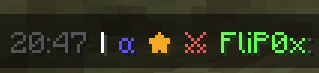
Simple Player Badges is a mod that enhances your in-game chat by allowing custom player badges to appear next to player names. This mod lets you assign various badges to players and adds a timestamp feature for better chat readability. The timestamp functionality was inspired by Beautified Chat by Serilum. Thanks to Serilum for the inspiration, as some of their features were recreated into this mod.
Configuration:
To configure the badges, you'll need to create a badgenames.json file in the config folder of your Minecraft Server. The JSON configuration contains two primary sections:
players: This is where you assign badges to specific players by name.
badges: Here you define the properties of each badge, including its symbol, color, and hover text.
Here's an example configuration:
{
    "players": [
        {
            "name": "Player1",
            "badges": ["badge1", "badge2", "badge3"]
        },
        {
            "name": "Player2",
            "badges": ["badge2"]
        }
    ],
    "badges": {
        "badge1": {
            "symbol": "★",
            "color": "gold",
            "hover": "Badge1 Title"
        },
        "badge2": {
            "symbol": "α",
            "color": "blue",
            "hover": "Badge2 Title"
        },
        "badge3": {
            "symbol": "⚔",
            "color": "red",
            "hover": "Badge3 Title"
        }
    }
}
The configuration file should be saved in UTF-8 format to ensure special characters display correctly.
Operators can use /badges reload on runtime to update any changes made to badgenames.json.
Explanation of Fields:
Spoilerplayers:
- name: The Minecraft username of the player.
- badges: A list of badge names assigned to the player. Each badge name refers to a badge defined in the badges section.
badges:
- symbol: The symbol or text that will be displayed as the badge next to the player's name in chat. This can include text and symbols.
- color: The color of the badge symbol. Use standard Minecraft color names (like gold, blue, red, etc.).
- hover: The text that appears when you hover over the badge in chat.
To-Do:
- Automatic Config Generation if Config doesn't already exist
- Creating and assigning badges with commands
- Option to enable and disable certain features
- Edition: Minecraft Java
- File type: .jar
- Minecraft version listed: 1.21.3
- How to install: Install the matching mod loader (Forge, Fabric or NeoForge) for your Minecraft version. → Download the .jar. → Put it in the .minecraft/mods folder and launch that loader profile.
- Where to get it: Opens on Modrinth — not every file is mirrored on our own servers.
Install steps are the general flow for this file type — How to install Minecraft Java mods & modpacks walks through it step by step.
- Ships as SimplePlayerBadges-1.0.0.jar — drop this file into the mods folder
- Download size: 14 KB
- Download link checked 11 Sept 2026 — working
These come from our own check of the pack file, not from the source page.