
Mogrul Calendar
Java mod listed for Minecraft 1.21. Downloads from the MC Java Mods app on Android.
A simple server-side customisable calendar display for those that want to add a bit more realism to their servers
⬇ Download on Modrinth
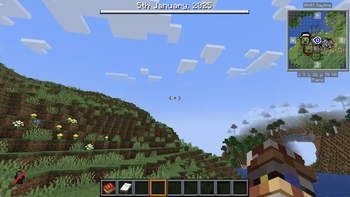
A fully-customisable server-side calender mod for NeoForge, spicing up your servers with realism - players can see the date on the top of their screen when they sleep or right click on a bed; you can even add your own months and limit the amount of months for a lore server; go wild!
Example


Configuration
When the mod first loads, a mogrulcalender-common.toml file containing customisations will be loaded in your servers config directory - you can change almost every aspect of the calender from here.
[Display]
	#In seconds, how long should the text display after waking up.
	# Default: 5
	# Range: > 0
	wakeDisplayTimeoutSeconds = 5

[Calender]
	#Year the server starts at.
	# Default: 2025
	# Range: > 1
	startingYear = 2025
	#Months the server starts at.
	# Default: 1
	# Range: > 1
	startingMonths = 1
	#Days the server starts at.
	# Default: 1
	# Range: > 1
	startingDays = 1
	#List of month followed by days in months for the calender display.
	calenderMonths = [
      "January=31", "February=28", "March=31",
      "April=30", "May=31", "June=30",
      "July=31", "August=31", "September=30",
      "October=31", "November=30", "December=31"
    ]
- Edition: Minecraft Java
- File type: .jar
- Minecraft version listed: 1.21.1
- How to install: Install the matching mod loader (Forge, Fabric or NeoForge) for your Minecraft version. → Download the .jar. → Put it in the .minecraft/mods folder and launch that loader profile.
- Where to get it: Opens on Modrinth — not every file is mirrored on our own servers.
Install steps are the general flow for this file type — How to install Minecraft Java mods & modpacks walks through it step by step.
- Ships as mogrulcalendar-0.1.2-1.21.1.jar — drop this file into the mods folder
- Download size: 15 KB
- Download link checked 22 Oct 2026 — working
These come from our own check of the pack file, not from the source page.