
BinSlot
This mod adds a trash can slot to your inventory, allowing you to quickly and safely dispose of unwanted items. Type "/trash" in chat to open the new…
⬇ Download on Modrinth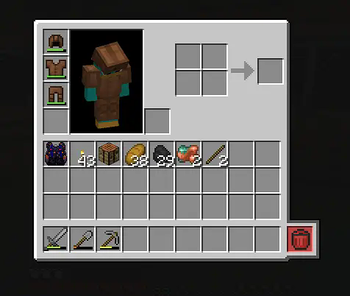
🗑️ BinSlot – Crafting Table With Automatic Trash Slot
BinSlot is a Minecraft mod that adds a custom crafting table featuring a special "bin slot". This slot automatically handles leftover items produced during crafting, helping reduce inventory clutter.
🔍 How It Works
When crafting recipes that generate extra items (like empty buckets or bottles), BinSlot will attempt to return them to your inventory. If there's no available space, those items will be discarded automatically using the bin slot.
This behavior mimics the crafting logic of vanilla Minecraft, but improves usability for players who craft large amounts of items or play with recipe-heavy modpacks.
🧰 Features
- A custom crafting table with a standard 3x3 grid
- An extra output slot for handling recipe results
- Automatic cleanup of leftover items (e.g. buckets, bottles)
- Supports all vanilla Minecraft recipes
- Helps avoid manual inventory management during crafting
🛠 Requirements
- Minecraft Java 1.21.3
- Forge 53.1
📌 Notes
- The mod uses Minecraft's standard recipe system.
- It does not require any other mods to function.
- BinSlot is a lightweight quality-of-life addition, especially useful in survival and modded environments.
🔧 Future Plans
Planned features may include:
- Customization options for trash behavior
- Compatibility with other mods
- Integration with recipe automation tools
If you find a bug or have suggestions, feel free to share them in the project’s issue tracker or discussion page.
- Edition: Minecraft Java
- File type: .jar
- Minecraft versions listed: 1.21.3, 1.21.4, 1.21.5
- How to install: Install the matching mod loader (Forge, Fabric or NeoForge) for your Minecraft version. → Download the .jar. → Put it in the .minecraft/mods folder and launch that loader profile.
- Where to get it: Opens on Modrinth — not every file is mirrored on our own servers.
Install steps are the general flow for this file type — How to install Minecraft Java mods & modpacks walks through it step by step.
- Ships as binslot-1.0-SNAPSHOT.jar — drop this file into the mods folder
- Download size: 32 KB
- Download link checked 21 Aug 2026 — working
These come from our own check of the pack file, not from the source page.