
Overview
Allows the user to run a command which will generate the stained glass patterns needed to form a gradient between the two colors they choose.
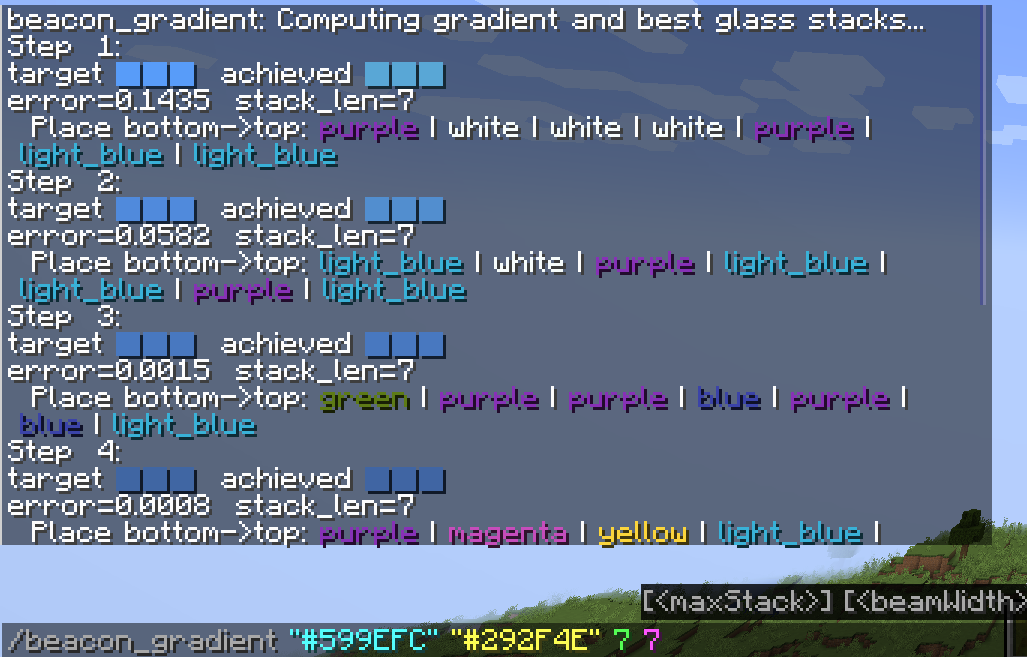
The mod will output the target color and the color it was able to achieve by using glass panes for the beacon beam. This will also give the margin of error the actual color is from the targeted color.
The mod uses the following algorithm to be able to calculate beacon beam colors from stained glass:
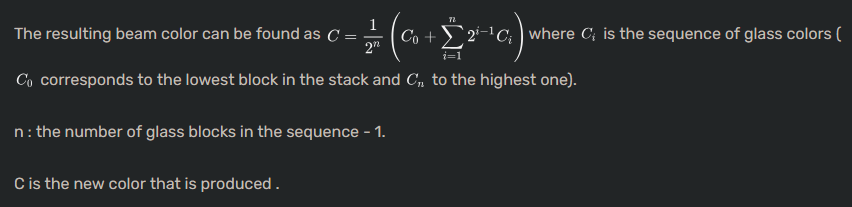
This calculation is referenced from the minecraft wiki page for beacons
Usage
Use /beacon_gradient
startColor- This is the starting color of your gradient. This can be a hex color (Include the # in the hex color) or a basic color written out like
"red"
- This is the starting color of your gradient. This can be a hex color (Include the # in the hex color) or a basic color written out like
Required Parameters
endColor- This is the ending color of your gradient. This can be a hex color (Include the # in the hex color) or a basic color written out like
"red"
- This is the ending color of your gradient. This can be a hex color (Include the # in the hex color) or a basic color written out like
beacons- This is the number of beacons you will be wanting to place
Optional Parameters
maxStack- This is the maximum height of stained glass you are willing to use. The larger the number the more accurate the gradient will be, but the default value of
7is quite accurate and should not need to be increased. WARNING Anything more than 7 will cause computational times to expoentially increase. Lower end hardware be aware
- This is the maximum height of stained glass you are willing to use. The larger the number the more accurate the gradient will be, but the default value of
beamWidth- Controls how many candidate glass stacks are considered simultaneously when the algorithm is trying to approximate the target color for a beacon beam
Example
Quick facts
- Edition: Minecraft Java
- File type: .jar
- Minecraft version listed: 1.21.4
- How to install: Install the matching mod loader (Forge, Fabric or NeoForge) for your Minecraft version. → Download the .jar. → Put it in the .minecraft/mods folder and launch that loader profile.
- Where to get it: Opens on Modrinth — not every file is mirrored on our own servers.
Install steps are the general flow for this file type — How to install Minecraft Java mods & modpacks walks through it step by step.
Verified by MCModsHub
- Ships as beacon-gradient-1.0.0.jar — drop this file into the mods folder
- Download size: 68 KB
- Download link checked 11 Sept 2026 — working
These come from our own check of the pack file, not from the source page.