
Blank Music Disc
A mod that adds the possibility to craft a "Blank Music Disc" with various customizations for use with AudioPlayer!
⬇ Download on Modrinth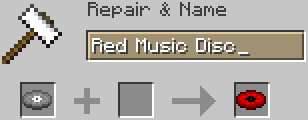


Blank Music Disc
Are you tired of using the often rare in-game Music Discs to apply your audio with AudioPlayer on? Are you tired of having to sacrifice your Creator or Relic Music Disc to have a cool looking custom Music Disc?
Well, we were, so we created a solution. Introducing the Blank Music Disc Mod.
Content
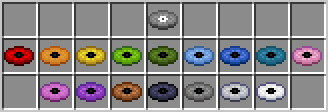
The Blank Music Disc Mod adds a new craftable item in the game, the Blank Music Disc. Putting the Blank Music Disc inside a Jukebox will emit a static sound, letting the player know no audio is applied on it. It is strongly recommended to use AudioPlayer to apply audio on it.
Obtainance
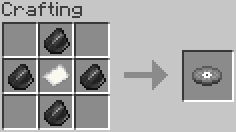
To obtain the Blank Music Disc, the player must craft it using a Crafting Table by using 4x Flint and 1x Paper (see below).
Crafting Recipe (Blank Music Disc)
Customizations
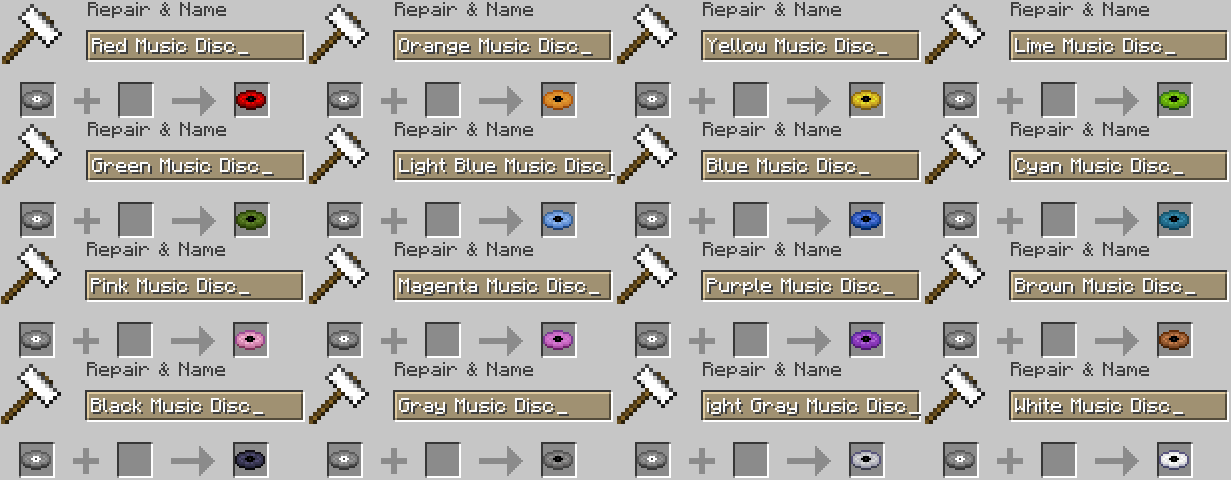
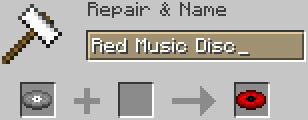
There are currently (as of version 1.0.0 (1.21.7)) 16 customizations that can be applied to the Blank Music Disc. These can be applied by using an anvil and renaming the Blank Music Disc to the following names:
- "Red Music Disc" -> Red
- "Orange Music Disc" -> Orange
- "Yellow Music Disc" -> Yellow
- "Lime Music Disc" -> Lime
- "Green Music Disc" -> Green
- "Light Blue Music Disc" -> Light Blue
- "Blue Music Disc" -> Blue
- "Cyan Music Disc" -> Cyan
- "Pink Music Disc" -> Pink
- "Magenta Music Disc" -> Magenta
- "Purple Music Disc" -> Purple
- "Brown Music Disc" -> Brown
- "Black Music Disc" -> Black
- "Gray Music Disc" -> Gray
- "Light Gray Music Disc" -> Light Gray
- "White Music Disc" -> White
Anvil Renaming (Blank Music Disc)
AudioPlayer
The mod will work without AudioPlayer although it is very much recommended to use AudioPlayer to apply audio to the disc.
Installation
Client (Singleplayer):
- Drag the Blank_Music_Disc.jar file (see Versions) into the mods folder of your client.
- Enjoy!
Server (Multiplayer):
- If you convert the Blank_Music_Disc.jar into a ZIP file, and then add it as a server resource pack, step 1 won't be necessary.
- Drag the Blank_Music_Disc.jar file (see Versions) into the mods folder of your client (every player).
- Drag the Blank_Music_Disc.jar file (see Versions) into the mods folder of your server.
- Enjoy!
Support
We do not have a GitHub page nor do we have a Discord Server although we do use the mod for our own server, so we do update it as much as we can. We appreciate you guys for trying the mod out, it is our first one!
Credits
- Blank Music Disc sound derived from record scratch skip loop by TRP (Freesound) under the Pixabay Content License.
- Inspiration from the AudioPlayer Blanks, Blank Discs and ellediscs. mods.
- Edition: Minecraft Java
- File type: .jar
- Minecraft version listed: 1.21.7
- How to install: Install the matching mod loader (Forge, Fabric or NeoForge) for your Minecraft version. → Download the .jar. → Put it in the .minecraft/mods folder and launch that loader profile.
- Where to get it: Opens on Modrinth — not every file is mirrored on our own servers.
Install steps are the general flow for this file type — How to install Minecraft Java mods & modpacks walks through it step by step.
- Ships as Blank Music Disc.jar — drop this file into the mods folder
- Download size: 293 KB
- Download link checked 11 Sept 2026 — working
These come from our own check of the pack file, not from the source page.