
ModsJava
Game Mod
A full-featured mini-game manager with countdown display, settings GUI, custom spawn radius, and world border control.
I don't know my version or loader
Open the Minecraft launcher and look at the profile you play on — it names both, like fabric-loader-1.21.4. The version also shows in the bottom-right corner of the game's main menu.
No loader in the profile name? Then it's plain Minecraft, and these mods won't run — you need Fabric or NeoForge installed first.



⚔ GameMod
— Fabric 1.21.x
A full-featured mini-game manager with countdown display, settings GUI, custom spawn radius, and world border control.
Required Dependencies (install alongside this mod)
| Mod | Download |
|---|---|
| Fabric API | https://modrinth.com/mod/fabric-api |
| Cloth Config | https://modrinth.com/mod/cloth-config |
| ModMenu | https://modrinth.com/mod/modmenu |
Commands (requires op level 2)
Game Control
| Command | Effect |
|---|---|
/game start |
Begin countdown (if set) then launch the game |
/game stop |
Cancel countdown or end an active game |
/game cooldown <time> |
Set countdown duration (e.g. 10s, 5m, 2h) |
/game cooldown |
Show current cooldown setting |
Settings
| Command | Effect |
|---|---|
/game settings or /game settings list |
Print all current settings |
/game settings display actionbar |
Show countdown in the action bar |
/game settings display bossbar |
Show countdown in a boss bar |
/game settings spawn here |
Set spawn to your current position |
/game settings spawn <x> <y> <z> |
Set spawn to exact coordinates |
/game settings radius <blocks> |
Scatter players within N blocks of spawn (0 = exact) |
/game settings border <size> |
Set world border diameter for the game |
/game settings cooldown <time> |
Same as /game cooldown <time> |
/game settings reset |
Reset everything to defaults |
Settings GUI (ModMenu)
Open the Mods screen in-game → find Game Mod → click the ⚙ button.
Categories:
- Display — boss bar vs action bar toggle
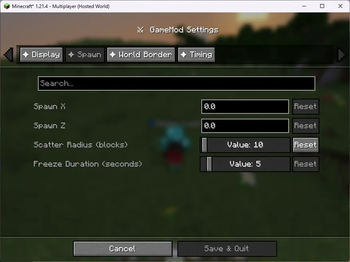
- Spawn Location — X / Y / Z coordinates + scatter radius
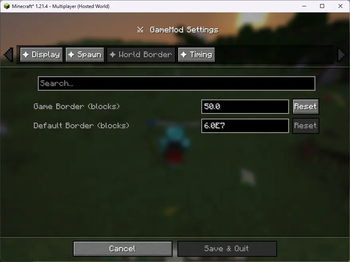
- World Border — game size and post-game reset size
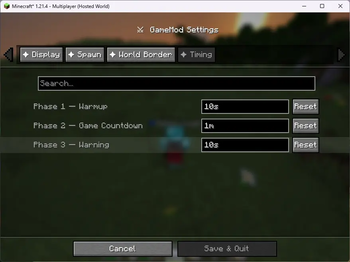
- Cooldown — duration in
s / m / hformat
Settings are saved to config/gamemod.json automatically.
How it Works
/game start flow
- Checks for an active countdown or game (blocks if already running)
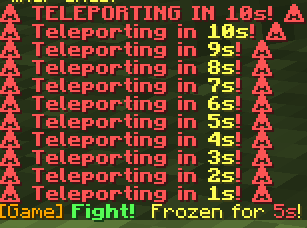
- If cooldown > 0: counts down, displaying progress on all players' screens
- At zero (or instantly): teleports all online players to a random position within the spawn radius, sets world border centred on the spawn coordinates, sets everyone to Survival
Random radius teleport
- If
radius = 0: all players land on the exact spawn point - If
radius > 0: each player gets a random angle and distance within the radius; Y is found automatically using the terrain heightmap (players always land on solid ground, not in mid-air or underground)
Eliminated players
When a player dies while a game is active they are automatically switched to Spectator mode. /game stop returns all spectators to Survival.
Countdown display
| Remaining | Action bar colour | Boss bar colour |
|---|---|---|
| > 10s | 🟢 Green | Green |
| 6 – 10s | 🟡 Yellow | Yellow |
| ≤ 5s | 🔴 Red | Red |
Config file
config/gamemod.json — edited by the GUI or commands, reloaded on next server start.
{
  "useBossBar": false,
  "spawnX": 0.0,
  "spawnY": 64.0,
  "spawnZ": 0.0,
  "spawnRadius": 25,
  "gameBorderSize": 200.0,
  "defaultBorderSize": 60000000.0,
  "cooldownSeconds": 30
}
Verified by MCModsHub
- Ships as gamemod-neoforge-1.0.0.jar — drop this file into the mods folder
- Download size: 28 KB
- Download link checked 21 Aug 2026 — working
These come from our own check of the pack file, not from the source page.