
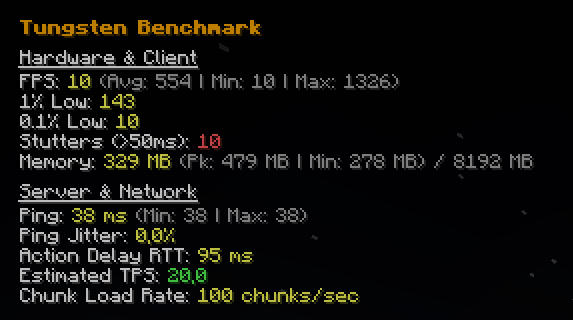
Tungsten Benchmark
Tungsten is a comprehensive, precise, and passive observability and benchmarking tool for Minecraft (Fabric).
Unlike optimization mods that attempt to alter game logic, Tungsten focuses entirely on giving you accurate, real-time analytics to help you diagnose exactly why your game feels laggy. We strictly observe game state without modifying server packets, ticking, or engine loops, ensuring full compliance with both Modrinth guidelines and strict server rules.
What Does Tungsten Track?
Tungsten provides a clean, smooth in-game HUD overlay (/tungsten toggle) alongside an active file-logging suite (/tungsten log start) that measures performance across three critical pillars: Hardware, Memory, and Network.
🎮 Frametime & Hardware Analytics
Relying on standard FPS numbers hides micro-stutters. Tungsten intercepts the core render loop to track precise microsecond delays between frames:
- Current, Average, Peak, and Minimum FPS
- 1% and 0.1% Lows: Identifies if your framerate is consistently dropping during intense moments.
- Stutter Detection: Accurately counts how many times your game drops below a playable 20fps equivalent (>50ms frame time).
🧠 JVM Memory Monitoring
Minecraft lag is frequently caused by Java Garbage Collection sweeps.
- Live Memory Footprint: Watch your real-time Used Memory vs Max Allocated Memory to instantly identify if GC spikes are the exact cause of your recorded frame drops.
🌐 Advanced Network & Server Metrics
Stop wondering if the lag is your PC, your internet, or the server hardware.
- Estimated Server TPS: By tracking the delta time between the server's dispatched
WorldTimeUpdatepackets, Tungsten accurately estimates if the host server itself is lagging behind 20.0 TPS. - Chunk Load Bandwidth: Tracks exactly how many chunks your client is downloading per second to help identify choked internet bandwidth.
- Ping & Ping Jitter: Passively evaluates your connection stability, tracking extreme ping variance and highest jitter percentages.
- Action Routing Delay (RTT): Hooks into packet confirmations to determine your physical input latency when breaking blocks or hitting entities.
Active Logging
Need to benchmark a new optimization mod or compare two shaderpacks?
Run /tungsten log start. Tungsten will silently begin graphing every extreme high, explicit low, standard deviation, and stutter that occurs while you play.
Run /tungsten log stop to automatically crunch the data and generate an exhaustive .txt report inside your tungsten-benchmarks/ directory, giving you permanent mathematical proof of how smooth your game truly was during that window.
Technical Transparency
Per Modrinth's Content Rules regarding performance data:
- No Optimization Claims: Tungsten is exclusively a read-only analytics dashboard. It does not contain game-altering engine tweaks to improve your gameplay.
- Data Gathering Mechanics: FPS and lows are calculated via a
MinecraftClient.rendermixin capturing trueSystem.nanoTime()deltas. Server TPS is mathematically derived client-side viaWorldTimeUpdateS2CPacketintervals. All data gathered is directly represented without arbitrary modifiers algorithms.
- Edition: Minecraft Java
- File type: .jar
- Minecraft version listed: 1.21.11
- How to install: Install the matching mod loader (Forge, Fabric or NeoForge) for your Minecraft version. → Download the .jar. → Put it in the .minecraft/mods folder and launch that loader profile.
- Where to get it: Opens on Modrinth — not every file is mirrored on our own servers.
Install steps are the general flow for this file type — How to install Minecraft Java mods & modpacks walks through it step by step.
- Ships as tungsten-1.0.0.jar — drop this file into the mods folder
- Download size: 485 KB
- Download link checked 21 Aug 2026 — working
These come from our own check of the pack file, not from the source page.