
InvadedQueueShortener
Java mod listed for Minecraft 26.x. Downloads from the MC Java Mods app on Android.
I don't know my version or loader


InvadedLands Queue Shortener
A client-side Fabric mod that shortens InvadedLands queue messages so your chat stays clean and easy to read.
InvadedLands queue messages normally include extra rank and leave-queue info every time your queue position updates. This mod trims that down to the useful part: which queue you are in and your current position.
Server IP: invadedlands.net
Features
- Shortens long InvadedLands queue messages
- Supports multiple queues at the same time
- Splits broken combined queue messages into separate chat lines
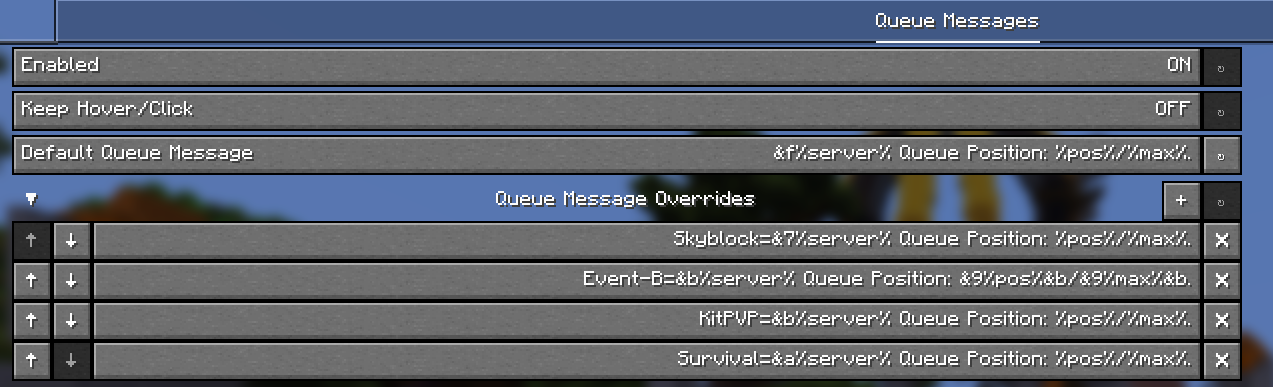
- Custom queue message formats through the config
- Per-queue custom messages
- Minecraft color/style code support, like
&f,&7,&b,&l,&o, etc. - Placeholders:
%server%- queue/server name%pos%- current queue position%max%- max queue size
- Optional hover/click interaction support
- Can be enabled or disabled from the config
- Works with Mod Menu and YACL config screen
Example Config
enabled=true
keepOriginalInteractions=false
default=&e%server% Queue Position: %pos%/%max%.
Event-B=&c&l%server% &fQueue Position: &b%pos%&7/&b%max%.
KitPVP=&b%server% Queue Position: &f%pos%&7/&f%max%.

Before Installing

After Installing

Hover Message
The original hover/click message can be kept if enabled in the config.
You can also turn it off to avoid accidentally clicking the message and leaving the queue.
Made by Articuling, aka xCheezie
- Edition: Minecraft Java
- File type: .jar
- Minecraft versions listed: 26.1, 26.1.1, 26.1.2
- How to install: Install the matching mod loader (Forge, Fabric or NeoForge) for your Minecraft version. → Download the .jar. → Put it in the .minecraft/mods folder and launch that loader profile.
- Where to get it: Opens on Modrinth — not every file is mirrored on our own servers.
Install steps are the general flow for this file type — How to install Minecraft Java mods & modpacks walks through it step by step.
- Ships as InvadedQueueShortener-1.3+26.2.jar — drop this file into the mods folder
- Download size: 137 KB
- Download link checked 22 Oct 2026 — working
These come from our own check of the pack file, not from the source page.