

Play music in Minecraft using the /src. command and the Boombox! supports MP3 format, volume control, and the ability to send music to other players.
Boombox - Plays at a distance of 16 blocks.
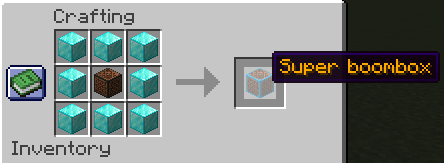
Super Boombox - Plays at a distance of 32 blocks and plays louder than a regular Boombox.
Commands from version 1.0.1 are only available to operators
Available Commands:
- /src "" – to myself
- /src @a "" – everyone
- /src PlayerName "" – specific
- /src stop – to myself
- /src stop @a – everyone
- /src stop PlayerName – specific
- /src volume 0.5 – to myself
- /src volume @a 0.5 – everyone
- /src volume PlayerName 0.5 – specific
The mod is still under development and will be gradually improved!
Dependencies: Fabric API
If you find an error, please write under any post in the Boosti, and I will correct it.
Quick facts
- Edition: Minecraft Java
- File type: .jar
- Minecraft version listed: 1.20.1
- How to install: Install the matching mod loader (Forge, Fabric or NeoForge) for your Minecraft version. → Download the .jar. → Put it in the .minecraft/mods folder and launch that loader profile.
- Where to get it: Opens on Modrinth — not every file is mirrored on our own servers.
Install steps are the general flow for this file type — How to install Minecraft Java mods & modpacks walks through it step by step.
Verified by MCModsHub
- Ships as eventmusic-1.0.1.jar — drop this file into the mods folder
- Download size: 685 KB
- Download link checked 21 Aug 2026 — working
These come from our own check of the pack file, not from the source page.