
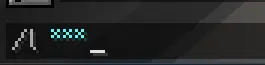
🔐 PassEncryptor
Protect your passwords from prying eyes – even in chat logs and streams.
PassEncryptor is a lightweight Fabric mod that automatically hides sensitive input when you type authentication commands. Instead of displaying your password in plain text, it replaces each character with a configurable mask symbol (like * or •). Your password stays visible to you while you type, but on‑screen and in recordings it appears fully masked – perfect for streamers, content creators, or anyone playing on public servers.
✨ Features
- Automatic password masking – hides passwords for login/register commands.
- Fully configurable – choose which commands trigger the mask and what symbol to use.
- Streamer‑friendly – prevents accidental password leaks on stream or in screenshots.
- Simple toggle – enable or disable the mod with one click in the settings.
- Mod Menu & Cloth Config integration – configure everything from an in‑game GUI.
- Client‑side only – works on any server without needing server‑side installation.
📥 Installation
- Install Fabric Loader and Fabric API for Minecraft 1.21.x.
- Download Cloth Config API and Mod Menu (optional but recommended).
- Put
PassEncryptor.jarinto your.minecraft/mods/folder. - Launch the game and adjust the settings via Mod Menu or manually edit the config file.
⚙️ Configuration
Open the config screen from Mod Menu or edit .minecraft/config/passencryptor.json directly.
| Option | Description |
|---|---|
| Enable Mod | Turn password masking on/off. |
| Masking Symbol | Character used to replace password letters (default: *). |
| Commands to Hide | List of command prefixes that trigger masking (include a space at the end!). |
Default commands:/l , /log , /login , /reg , /register
⚠️ Important – Always include a space after the command (e.g.
/login). Otherwise the mask won’t work correctly.
🎮 How It Works
When you type any of the configured commands, the mod intercepts the displayed text in the chat input field. The command prefix stays readable, but every character of the password is replaced by the mask symbol in real time. The actual message sent to the server remains unchanged – only the visual representation is masked.
📜 Compatibility
- Minecraft: 1.21.x (Fabric)
- Dependencies: Fabric API, Cloth Config API
- Optional: Mod Menu (for in‑game config screen)
- Servers: Works with any server, no server‑side mod required.
🐛 Known Issues & Support
- If the mask doesn’t appear, make sure the command in the list ends with a space.
- The mask only affects the display – your real password is still sent to the server.
- For bug reports or suggestions, please open an issue on the GitHub repository.
📄 License
MIT license.
Copyright © 2026 kameshekf
💬 Credits
- Author: kameshekf
- Built with Fabric Loom
- Config screen powered by Cloth Config API
- Mod Menu integration by TerraformersMC
Keep your secrets safe – even when the whole world is watching. 🛡️
🔐 PassEncryptor
Защитите свои пароли от посторонних глаз – даже в чате и записях стримов.
PassEncryptor – это лёгкий мод для Fabric, который автоматически скрывает вводимые пароли, когда вы набираете команды авторизации. Вместо отображения пароля в открытом виде, мод заменяет каждый символ на настраиваемый символ маски (например, * или •). Вы по‑прежнему видите свой пароль при наборе, но на экране и в записях он выглядит полностью замаскированным – идеально подходит для стримеров, создателей контента и всех, кто играет на публичных серверах.
✨ Возможности
- Автоматическое скрытие паролей – маскирует пароли для команд логина и регистрации.
- Полная настройка – выберите команды, которые нужно скрывать, и символ маски.
- Удобно для стримов – предотвращает случайную утечку пароля в трансляции или на скриншотах.
- Простое отключение – включите или выключите мод одним кликом в настройках.
- Интеграция с Mod Menu и Cloth Config – всё настраивается через игровой интерфейс.
- Только на клиенте – работает на любом сервере без установки на сервер.
📥 Установка
- Установите Fabric Loader и Fabric API для Minecraft 1.21.x.
- Скачайте Cloth Config API и Mod Menu (опционально, но рекомендуется).
- Поместите
PassEncryptor.jarв папку.minecraft/mods/. - Запустите игру и настройте мод через Mod Menu или вручную отредактировав файл конфигурации.
⚙️ Настройка
Откройте экран настроек через Mod Menu или отредактируйте .minecraft/config/passencryptor.json вручную.
| Опция | Описание |
|---|---|
| Включить мод | Включает или выключает маскировку паролей. |
| Символ маски | Символ, которым заменяются буквы пароля (по умолчанию: *). |
| Команды для скрытия | Список префиксов команд, которые запускают маскировку (обязательно с пробелом в конце!). |
Команды по умолчанию:/l , /log , /login , /reg , /register
⚠️ Важно – Всегда ставьте пробел после команды (например,
/login). Иначе маскировка не сработает.
🎮 Как это работает
Когда вы начинаете вводить одну из настроенных команд, мод перехватывает отображаемый текст в поле ввода чата. Префикс команды остаётся читаемым, но каждый символ пароля в реальном времени заменяется символом маски. Само сообщение, отправляемое на сервер, не меняется – маскируется только визуальное отображение.
📜 Совместимость
- Minecraft: 1.21.x (Fabric)
- Зависимости: Fabric API, Cloth Config API
- Опционально: Mod Menu (для экрана настроек в игре)
- Серверы: Работает на любых серверах, установка на сервер не требуется.
🐛 Известные проблемы и поддержка
- Если маскировка не появляется, убедитесь, что команда в списке заканчивается пробелом.
- Маскировка влияет только на отображение – ваш настоящий пароль всё равно отправляется на сервер.
- По вопросам багов и предложений открывайте issue на GitHub репозитории.
📄 Лицензия
MIT license.
Copyright © 2026 kameshekf
💬 Благодарности
- Автор: kameshekf
- Сделан с помощью Fabric Loom
- Экран настроек работает на Cloth Config API
- Интеграция с Mod Menu от TerraformersMC
Храните свои секреты в безопасности – даже когда весь мир смотрит. 🛡️
- Edition: Minecraft Java
- File type: .jar
- Minecraft version listed: 1.21.11
- How to install: Install the matching mod loader (Forge, Fabric or NeoForge) for your Minecraft version. → Download the .jar. → Put it in the .minecraft/mods folder and launch that loader profile.
- Where to get it: Opens on Modrinth — not every file is mirrored on our own servers.
Install steps are the general flow for this file type — How to install Minecraft Java mods & modpacks walks through it step by step.
- Ships as passencryptor-2.0.jar — drop this file into the mods folder
- Download size: 13 KB
- Download link checked 11 Sept 2026 — working
These come from our own check of the pack file, not from the source page.