
Auto Reset Player Data
Java mod listed for Minecraft 26.x. Downloads from the MC Java Mods app on Android.
⬇ Download on ModrinthAutoRePlayer Mod
A server-side mod that automatically resets a player’s data after death.
How it Works?
When a player dies, the mod does not reset them immediately. It first allows the normal death screen to appear, then waits until the player respawns. After that, the player is disconnected and their saved files are cleared, including player data, stats, advancements, and optional backup data.
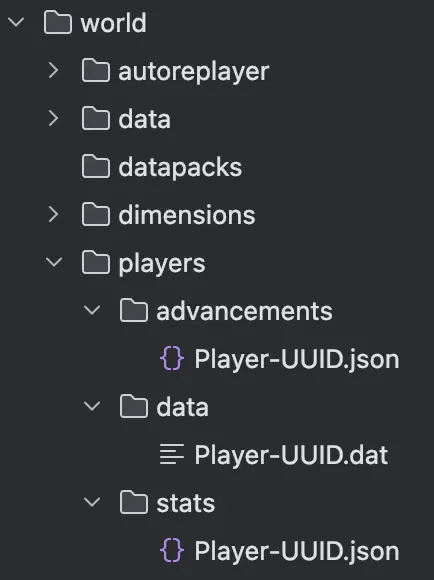
This makes the player rejoin with a clean state instead of keeping their previous progress.
Commands
The mod also includes several commands.
/repl deadscoreshows how many times each player has died on the server./repl locklistshows players who are currently waiting for reset or are in the middle of the reset process./repl locklist <player> removemanually removes a player from the lock list if an administrator needs to clear it.
You should not set the server world to Hardcore mode. In Hardcore, players are switched to Spectator mode unlike in Survival, so the mod may not detect things correctly.
Requirements
- Minecraft 26.1+
- Fabric Loader
- Fabric API (required)
- Server-side only (clients do not need to install the mod)
To help us develop a more convenient and better mod, please share any bugs, issues, or feature ideas you have! -> Bug Report
It is designed to be simple, lightweight, and stable for dedicated server use.
- Edition: Minecraft Java
- File type: .jar
- Minecraft versions listed: 26.1, 26.1.1, 26.1.2
- How to install: Install the matching mod loader (Forge, Fabric or NeoForge) for your Minecraft version. → Download the .jar. → Put it in the .minecraft/mods folder and launch that loader profile.
- Where to get it: Opens on Modrinth — not every file is mirrored on our own servers.
Install steps are the general flow for this file type — How to install Minecraft Java mods & modpacks walks through it step by step.
- Ships as autoreplayer-26.1-1.1.0.jar — drop this file into the mods folder
- Download size: 44 KB
- Download link checked 22 Oct 2026 — working
These come from our own check of the pack file, not from the source page.