
My Ally
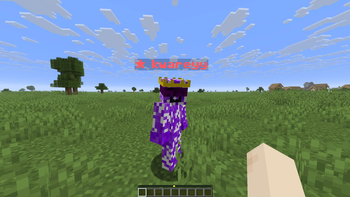
My Ally is a lightweight client-side Minecraft mod that lets you mark players as allies by customizing how their nicknames appear
⬇ Download on Modrinth

My Ally
My Ally is a Fabric client-side mod that allows you to manually add players as allies by entering their nickname and customizing its appearance.
Default keybind for opening menus is Y

You can assign each player a unique color, choose between a simple colored name or a brighter highlighted style, and optionally add a small symbol next to their name.
The mod works only visually and applies to the name above the player and in the TAB list, without affecting gameplay, combat, or visibility, making it ideal for PvP and team play to easily distinguish teammates.
- Edition: Minecraft Java
- File type: .jar
- Minecraft version listed: 1.21.11
- How to install: Install the matching mod loader (Forge, Fabric or NeoForge) for your Minecraft version. → Download the .jar. → Put it in the .minecraft/mods folder and launch that loader profile.
- Where to get it: Opens on Modrinth — not every file is mirrored on our own servers.
Install steps are the general flow for this file type — How to install Minecraft Java mods & modpacks walks through it step by step.
- Ships as MyAlly-1.18.4-1.0.jar — drop this file into the mods folder
- Download size: 23 KB
- Download link checked 11 Sept 2026 — working
These come from our own check of the pack file, not from the source page.