
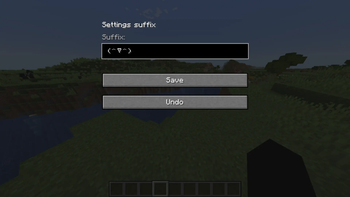
The Chat Suffix mod allows you to automatically add a custom suffix to all chat messages. This solution is designed for players who want to differentiate their messages in a multiplayer environment or simply add a unique touch to their communications. functionality The mod integrates into the Minecraft client and modifies messages sent before transmitting them to the server. The system correctly processes all message types, excluding commands (lines beginning with the / symbol), ensuring full functionality of game commands. configuration The mod's main settings are stored in the configuration file:
minecraft/config/chatsuffix.toml
An alternative configuration method is available through the graphical interface, which is accessed by pressing the ** K** key (can be changed in the control settings).
_Settings changed through the game interface may not be saved when the client is restarted or the game world is exited. For permanent configuration, we recommend using a file-based configuration. _
- Edition: Minecraft Java
- File type: .jar
- Minecraft version listed: 1.18.2
- How to install: Install the matching mod loader (Forge, Fabric or NeoForge) for your Minecraft version. → Download the .jar. → Put it in the .minecraft/mods folder and launch that loader profile.
- Where to get it: Opens on Modrinth — not every file is mirrored on our own servers.
Install steps are the general flow for this file type — How to install Minecraft Java mods & modpacks walks through it step by step.
- Ships as chatsuffix-1.18.2-2.2.2.jar — drop this file into the mods folder
- Download size: 9 KB
- Download link checked 12 Sept 2026 — working
These come from our own check of the pack file, not from the source page.