
Legacy OrthoCamera
A port of DimasKama's OrthoCamera to 1.8.9.
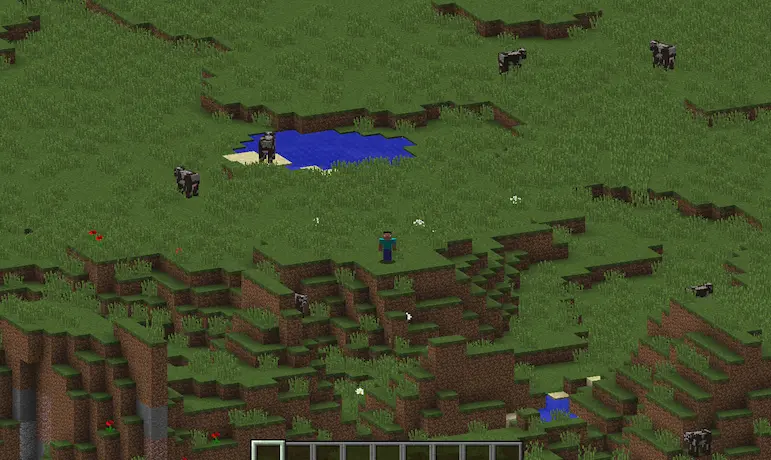
Provides an alternative camera view to visualize large areas.
Original Mod
For more details, review the original mod's page. Many of the features presented there are also present in this port:
https://modrinth.com/mod/orthocamera
Core features of (Legacy) OrthoCamera
- A client-side Minecraft Fabric mod that adds a toggleable & configurable orthographic camera mode.
- The orthographic camera keeps everything the same scale regardless of distance.
- Highly configurable: includes a config screen (via ModMenu or hotkey) to customize various features such as scale, hotkeys, etc.
Changes
Legacy OrthoCamera implements a few notable changes:
- Through the config screen, you can now show/hide the cursor while in orthocam. This only hides the cursor in ortho, not first or third person.
- Since the clouds obfuscate a lot in earlier versions, there is a setting to disable clouds in ortho. This only hides the clouds in ortho, not first or third person.
How to build
gradlew build
Permissions
Feel free to use Legacy OrthoCamera in any mods or modpacks.
Quick facts
- Edition: Minecraft Java
- File type: .jar
- Minecraft version listed: 1.8.9
- How to install: Install the matching mod loader (Forge, Fabric or NeoForge) for your Minecraft version. → Download the .jar. → Put it in the .minecraft/mods folder and launch that loader profile.
- Where to get it: Opens on Modrinth — not every file is mirrored on our own servers.
Install steps are the general flow for this file type — How to install Minecraft Java mods & modpacks walks through it step by step.
Verified by MCModsHub
- Ships as legacy-orthocamera-1.0.1.jar — drop this file into the mods folder
- Download size: 47 KB
- Download link checked 11 Sept 2026 — working
These come from our own check of the pack file, not from the source page.