
Distant Horizons Dimension Profiles
A mod to add per-dimension control over when Distant Horizons should be enabled, it can automatically enable/disable DH based on things like your…
⬇ Download on Modrinth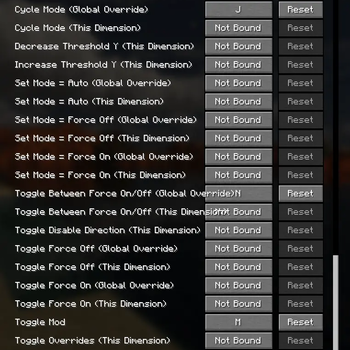
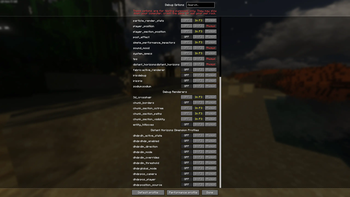






This mod allows you to configure when Distant Horizons should be enabled or disabled based on things like dimension and Y-level.
The filters can be changed per-dimension, and the mod supports custom dimensions as well.
If you are using Fabric, it is highly recommended to install Mod Menu.
The mod has many keybinds for allowing changing most settings easily without needing to open the menu.
The mod also adds keybind for manual enabling/disabling of Distant Horizons.
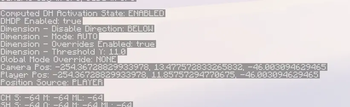
The mod also adds additional entries to the F3 menu (not enabled by default). The camera and player position entries can be very useful as they have 17 significant digits of precision.
When accessed while not in-game, the mod's settings menu shows options for all vanilla dimensions and any custom dimensions that have had custom settings saved...
When accessed while in-game, the mod's settings menu shows only options for dimensions that exist in the current world.
- Edition: Minecraft Java
- File type: .jar
- Minecraft version listed: 1.21.10
- How to install: Install the matching mod loader (Forge, Fabric or NeoForge) for your Minecraft version. → Download the .jar. → Put it in the .minecraft/mods folder and launch that loader profile.
- Where to get it: Opens on Modrinth — not every file is mirrored on our own servers.
Install steps are the general flow for this file type — How to install Minecraft Java mods & modpacks walks through it step by step.
- Ships as distant-horizons-dimension-profiles-1.0.0.jar — drop this file into the mods folder
- Download size: 47 KB
- Download link checked 12 Sept 2026 — working
These come from our own check of the pack file, not from the source page.