WorldVersionBackport
A minecraft fabric mod that allows older minecraft versions (pre 26.2) to load newer worlds that have been '''''''''upgraded''''''' and deupgrade them
⬇ Download on Modrinth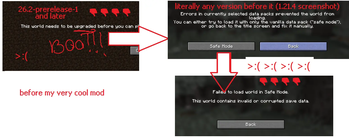
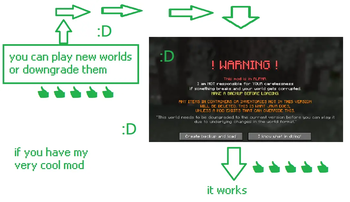

 THIS MOD IS IN ALPHA, I AM NOT RESPONSIBLE FOR YOUR CARELESSNESS, MAKE BACKUPS OF ANY WORLD YOU LOAD USING THIS MOD, CURRENTLY, IT DOES NOT FIX SERVERS
 https://github.com/DefaultUser9148/worldversionbackport
 https://modrinth.com/mod/worldversionbackport

!!! Make backups of any world before loading with this mod. Not responsible for data loss. Currently incompatible with servers. Why use new world folder when old one do trick?
A minecraft fabric mod to allow anyone playing older versions of minecraft (pre 26.2 which dont have Vulkan option) to load and play newer worlds which feature the Vulkan renderer in the video options. And also allows to deupgrade worlds, so you can then remove this mod
Optional: ModMenu
First made for 1.21.4, this version will get the most attention from me.
| MC Version | Support Status | Priority | Tested up to | End Of Life Status |
|---|---|---|---|---|
| 1.21.11 | Coming Soon | High | - | |
| 1.21.5-1.21.10 | Supported | High | - | |
| 1.21.4 | Supported | Main Mod Version | 26.2-prerelease-2 | |
| 1.21.3-1.21 | Coming Soon | Low | - |
Why?
Minecraft 26.2-snapshot-1 and i think any version after 26.2 (Which introduced the Vulkan renderer) made several changes to any world that was generated in a previous version because the world generation thing is hardcoded or something, but this 'Upgrading' that happens for older worlds almost COMPLETELY making ANY OTHER VERSION unable to load the world correctly or find any of the chunks/player files as it changes a lot of stuff, most notably the regions and playerdata, moving them into subfolders and making any old version regenerate all of the chunks in the root, and unable to find the playerdata.
Incompatibilities
| Mod | Issue | Last Checked |
|---|---|---|
| Rocks and Pebbles | Crashes when loading a 26.2 world due to new version-specific data | 9th April 2026 |
- Edition: Minecraft Java
- File type: .jar
- Minecraft version listed: 1.21.9
- How to install: Install the matching mod loader (Forge, Fabric or NeoForge) for your Minecraft version. → Download the .jar. → Put it in the .minecraft/mods folder and launch that loader profile.
- Where to get it: Opens on Modrinth — not every file is mirrored on our own servers.
Install steps are the general flow for this file type — How to install Minecraft Java mods & modpacks walks through it step by step.
- Ships as worldversionbackport-1.21.9-1.0.0.jar — drop this file into the mods folder
- Download size: 271 KB
- Download link checked 12 Sept 2026 — working
These come from our own check of the pack file, not from the source page.