
This mod is fully client-side and works on servers where it is not installed.
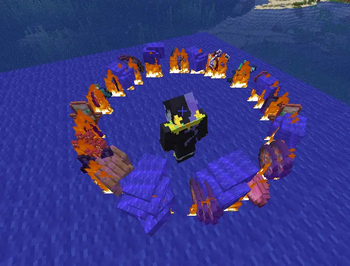
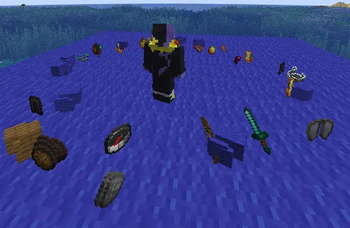
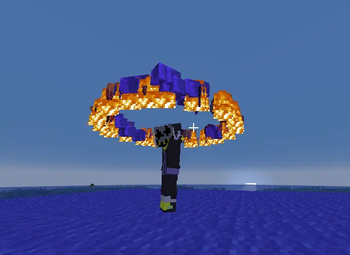
This mod allows you to throw your entire inventory away with just one button press There are quite flexible settings for the throwing itself, and the visual effects of it
Throw out your inventory --- Key Bindings ---
Scatter Drop — triggers the throw of all items from your inventory with selected visual effects.
Stop Animation — stops all visual effects (fire, enchant glint, floating, etc.).
--- Main Settings ---
1.Fire on Items — visual fire effect on thrown items.
2.Effect Duration — how many seconds visual effects last (force-stop with J).
3.Enchant Glint — thrown items shimmer as if enchanted.
4.Orbit Around Player — visual ring of thrown items around the player.
5.Items Float in Place — items float above the ground where they landed (if orbit is off).
6.Float Height — distance from player's feet at which items float.
7.Float Radius — radius of the orbit ring.
8.Spin Around Player — whether the orbit rotates.
9.Spin Speed — how fast the orbit(s) rotate.
10.Lock Orbit Height — orbit follows you but height stays fixed.
11.Lock Orbit Position — orbit stays at the spot where you activated the throw.
12.Scatter in Circle — throw in a circle or straight forward.
--- Pro Settings ---
1.Armor — throw equipped armor.
2.On Death (BETA) — throw on death (servers with respawn button); works with keepInventory.
3.Keep Fireworks & Blaze Rods — throw everything except fireworks and blaze rods.
4.Offhand — throw items held in the offhand.
5.Small Radius — off: throws 3-4 blocks away; on: throws 0.5-1 block.
6.When Last Player in Tab (BETA) — auto-throw when you kill the last player (Warning: may harm you outside minigames!).
7.When Only Teammates Remain (BETA) — auto-throw when no enemies remain in tab (Warning: use at your own risk!).
8.Only 2 Items/Tick (BETA) — for servers with strict anticheat. Does NOT guarantee ban safety — check with server admins first.
9.Orbit Rings — how many orbits (alternate clockwise / counter-clockwise).
10.Max Items per Ring — max item stacks per orbit.
11.Different Radius per Ring — use individual radius from settings 13-22.
12.Different Height per Ring — use individual height from settings 13-22.
13.Height and radius for each individual orbit (settings 13-22).
On some servers, this mod may be considered a cheat. Before using it, check if its features are on the list of banned functions. Or ask the administration I do not plan to export to other versions or to Forge/NeoForge. You need to install the fabric API and the Mod menu
The text in English will be at the bottom (scroll down)
- Edition: Minecraft Java
- File type: .jar
- Minecraft version listed: 1.21.1
- How to install: Install the matching mod loader (Forge, Fabric or NeoForge) for your Minecraft version. → Download the .jar. → Put it in the .minecraft/mods folder and launch that loader profile.
- Where to get it: Opens on Modrinth — not every file is mirrored on our own servers.
Install steps are the general flow for this file type — How to install Minecraft Java mods & modpacks walks through it step by step.
- Ships as pinata-1.0.1.jar — drop this file into the mods folder
- Download size: 153 KB
- Download link checked 22 Aug 2026 — working
These come from our own check of the pack file, not from the source page.