
BronzeBright
Java mod listed for Minecraft 1.20. Downloads from the MC Java Mods app on Android.
BronzeBright is a lightweight and highly efficient Night Vision / Fullbright utility mod for Minecraft. It allows players to instantly toggle perfect…
⬇ Download on Modrinth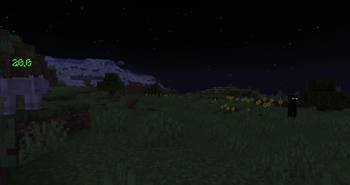
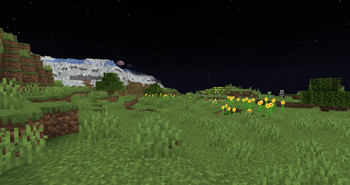
🌙 BronzeBright: See the Dark in a New Light Are you tired of carrying stacks of torches, squinting in dark caves, or constantly brewing Night Vision potions? BronzeBright is a simple, lightweight Quality of Life (QoL) mod designed to give you perfect vision in the darkest environments.
Whether you are deep-slate mining, building massive structures at night, or exploring the Deep Dark, BronzeBright ensures you never miss a detail.
✨ Features: 🔦 Instant Toggle: Turn perfect Night Vision on and off instantly with a single, customizable keybind (Default: V). 🌑 Pitch-Black Removal: Smoothly illuminates your surroundings without breaking the game's aesthetic. Say goodbye to complete darkness! ⚡ Extremely Lightweight: Designed with performance in mind. It won't drop your FPS or cause any lag. 🚫 No Potion Particles: Grants you clean vision without annoying potion swirls blocking your screen. 🌍 Client-Side Friendly: (If applicable to your mod) Can be used on multiplayer servers without needing to be installed on the server side (Note: Always check server rules regarding Fullbright mods!). ⚙️ How to Use: Install the mod and launch Minecraft. Go to your Controls/Keybinds menu. Find the BronzeBright category to set or check your toggle hotkey. Press the key in-game to light up your world! 📥 Compatibility: BronzeBright is fully compatible with most performance mods (like Sodium, Optifine, or Iris) and works seamlessly alongside shaders.
- Edition: Minecraft Java
- File type: .jar
- Minecraft versions listed: 1.20.1, 1.20.2, 1.20.3
- How to install: Install the matching mod loader (Forge, Fabric or NeoForge) for your Minecraft version. → Download the .jar. → Put it in the .minecraft/mods folder and launch that loader profile.
- Where to get it: Opens on Modrinth — not every file is mirrored on our own servers.
Install steps are the general flow for this file type — How to install Minecraft Java mods & modpacks walks through it step by step.
- Ships as bronzebright-1.0.0.jar — drop this file into the mods folder
- Download size: 4 KB
- Download link checked 23 Oct 2026 — working
These come from our own check of the pack file, not from the source page.