
CHIC
CHIC is an upgradable Minecraft mod featuring a Super Chicken entity that dynamically camouflages its color to match the block it stands on and lays that…
⬇ Download on Modrinth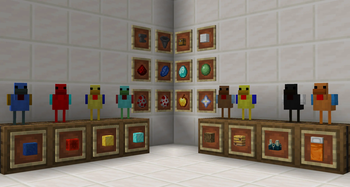

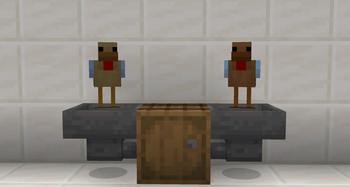
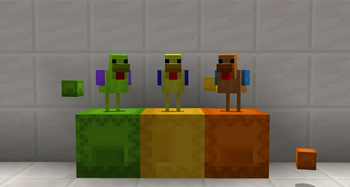
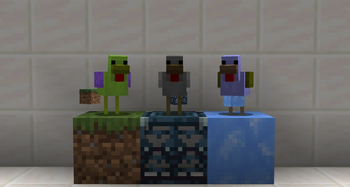

CHIC adds a utility mob to the game: the Super Chicken. It is a lag-friendly, highly configurable resource generator designed to duplicate blocks and items without complex machinery.

Getting Started
To get started, simply right-click a vanilla Chicken with a Golden Apple. The chicken will transform into a Super Chicken. By default, it will drop an item corresponding to the block it is standing on.
- Stand on Log -> Drops Log
- Stand on Diamond Ore -> Drops Diamond
Upgrades & Mechanics
The chicken is fully upgradable. Right-click the entity with the following items to improve its stats.
Spoiler
Core Stats
- Redstone (Speed): Reduces the time between drops. Can be stacked to make drops nearly instant.
- Lapis Lazuli (Yield): Increases the number of items dropped per cycle.
- Diamond (Memory Lock): Locks the chicken to the current block it is standing on. Once locked, you can move the chicken anywhere, and it will keep producing the original block.
Automation & Utility
- Hopper (Auto Export): Requires Memory Lock. The chicken will automatically push items into adjacent inventories (Chests, Barrels, etc.) instead of dropping them on the ground.

- Anvil (No AI): Weighs the chicken down. It stops moving, cannot be pushed, and uses significantly less server processing power.
- Wool (Mute): Silences the sound effects.
Advanced Features
- Slime Ball (Silk Touch): Forces the chicken to drop the block itself.

- Nether Star (Data Capture): Allows the chicken to copy TileEntity data. Useful for duplicating Shulker Boxes while keeping their contents.

Mod Support
- Jade / Waila: Looking at a chicken shows exactly what it is mining, its tier, speed, and lock status.

- JEI: Full support for viewing upgrade recipes and mechanics.
- Tags: All upgrade items use Item Tags, meaning modpack developers can easily change "Redstone" to any other item via Data Packs.
Configuration
Everything is configurable. You can adjust the max speed, drop caps, and global tick rates in the chic-common.toml config file to balance the mod for your specific modpack.
This is Beta 0.1. We are actively asking for feedback!
- Edition: Minecraft Java
- File type: .jar
- Minecraft version listed: 1.21.1
- How to install: Install the matching mod loader (Forge, Fabric or NeoForge) for your Minecraft version. → Download the .jar. → Put it in the .minecraft/mods folder and launch that loader profile.
- Where to get it: Opens on Modrinth — not every file is mirrored on our own servers.
Install steps are the general flow for this file type — How to install Minecraft Java mods & modpacks walks through it step by step.
- Ships as CHIC_NeoForge_1.21.1_V_0.1.0.jar — drop this file into the mods folder
- Download size: 263 KB
- Download link checked 22 Aug 2026 — working
These come from our own check of the pack file, not from the source page.