
ModsJava
ZMC's Currency Mod
Java mod listed for Minecraft 1.21. Downloads from the MC Java Mods app on Android.
⬇ Download on Modrinth





A simple currency mod for Minecraft, this mod is in very early beta. I will be updating to other loaders and newer / older versions depending on the demand / popularity.
Please let me know of any bugs you find, and please remember this mod is in early beta
1. Exchange Rate Command
- A Moderator on your world / server will need to run the /conversionitem command to define the exchange rate.
- The command will be formated /conversionitem [minecraft item] [bill], where bill is a denomination.
- EX. /conversionitem minecraft:diamond $10 This will set it to 1 diamond = 10 points
2. ATM Card
- An ATM card can be crafted with 3 lapis and 3 white concrete
- The ATM card will allow a player to store points digitally via an ATM
- An ATM card can be protected with a pin
- Points deposited to a card are stored on that card, you cannot access your money with another card.
3. ATM Block
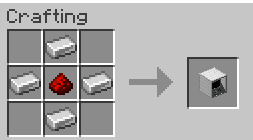
- An ATM Block can be crafted with 4 iron ingots, surrounding a redstone dust
- An ATM allows a player to register new cards they craft, deposit money, and withdrawl money.
- When registering a card, the money and pin of that card is reset, do not re-register a card with money on it
4. Exchange Rate Machine Block
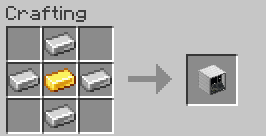
- Crafted with 4 iron ingots surrounding a gold ingot
- An ERM block allows players to both convert items to points, and points to items
- A player will be able to convert items to points / points to items based off of the exchange rate.
5. Point Conversion Block
- Crafted with 4 iron ingots surrounding a diamond
- Allows players to convert points between different denominations
- EX. A player could convert a 100 point bill into 100 1 point bills, or convert 5 100 point bills into 1 500 point bill
6. Wallet
- Crafted with 8 leather in a circle
- Has 18 slots for storing ATM cards and cash
- Has a counter in the top left corner that tells you the total amount in the wallet, also works with points on a ATM card.
7. Balance Command
- A command for admins to adjust the balance of an ATM card
- Formated /balance [set],[add],[subtract] [amount]
- When holding an ATM card in your main hand, use this command to adjust the total balance on the card
8. Point Bills
- Uncraftable, uptained by the Exchange Rate Machine
- In denominations of 1, 10, 100, 500, 1,000
Quick facts
- Edition: Minecraft Java
- File type: .jar
- Minecraft version listed: 1.21.4
- How to install: Install the matching mod loader (Forge, Fabric or NeoForge) for your Minecraft version. → Download the .jar. → Put it in the .minecraft/mods folder and launch that loader profile.
- Where to get it: Opens on Modrinth — not every file is mirrored on our own servers.
Install steps are the general flow for this file type — How to install Minecraft Java mods & modpacks walks through it step by step.
File checked by MCModsHub
- Ships as economy_mod-1.0.0-neoforge-1.21.4.jar — drop this file into the mods folder
- Download size: 267 KB
- Download link checked 3 Oct 2026 — working
These come from our own check of the pack file, not from the source page.