Hopper Lock Visualizer
Client-side debugging tool that highlights redstone-locked hoppers with a red wireframe. Instantly see which hoppers are disabled — no more guessing why…
⬇ Download on Modrinth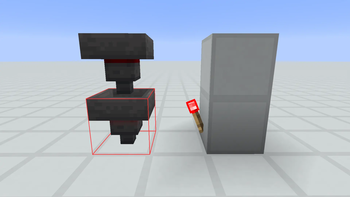
Hopper Lock Visualizer
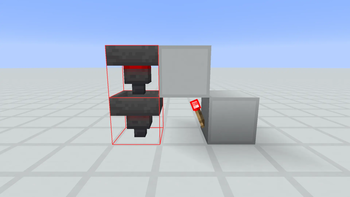
Built an item sorter and something isn't working? One of your hoppers is probably receiving an unintended redstone signal. This client-side mod wraps every locked hopper near you in a bright red outline, so you can spot the culprit at a glance.
What "Locked" Means
A hopper has two states controlled by the enabled block property:
- Enabled (default): pulls items in from above, pushes items out the spout. Normal behavior.
- Disabled (locked): frozen. Completely stops item transfer. Triggered by any redstone signal reaching the hopper — a torch, a pressure plate, a comparator, a stray wire from a neighboring circuit...
When a big contraption stops working, 9 times out of 10 the cause is a hopper accidentally receiving a redstone signal from something nearby. This mod makes that invisible problem visible.
Features
- One-key toggle — default
H(rebindable in Options > Controls) - 32-block radius scan around the player, refreshed twice per second
- Smart culling — distance + cone-based visibility check, so only hoppers in view get drawn
- Red wireframe rendering using Minecraft 1.21.11's new Gizmo API
- Client-only — works on any server, no server-side install needed
- Zero configuration — install and press H
Usage
- Install this mod and Fabric API
- Drop both into your
.minecraft/mods/folder - Launch Minecraft, join any world or server
- Press H → nearby locked hoppers get wrapped in a red outline
- Press H again to disable
Compatibility
| Feature | Support |
|---|---|
| Minecraft | 1.21.11 |
| Mod Loader | Fabric (Loader 0.18.0+) |
| Fabric API | Required |
| Java | 21+ |
| Side | Client-only |
Untested
- Quilt: Not tested, but should work since Quilt supports Fabric mods
- Forge/NeoForge: Not supported
Performance
The scan runs 2× per second, not every frame. Each scan reads block states only (no block entities, no inventories), so even in large bases with hundreds of hoppers the overhead is negligible. The render pass culls with distance + cone checks before calling Minecraft's Gizmo API — no manual matrix math, no state leaks
- Edition: Minecraft Java
- File type: .jar
- Minecraft version listed: 1.21.11
- How to install: Install the matching mod loader (Forge, Fabric or NeoForge) for your Minecraft version. → Download the .jar. → Put it in the .minecraft/mods folder and launch that loader profile.
- Where to get it: Opens on Modrinth — not every file is mirrored on our own servers.
Install steps are the general flow for this file type — How to install Minecraft Java mods & modpacks walks through it step by step.
- Ships as hopper-lock-visualizer-1.0.0.jar — drop this file into the mods folder
- Download size: 19 KB
- Download link checked 22 Aug 2026 — working
These come from our own check of the pack file, not from the source page.