
SoundRecording
Java mod listed for Minecraft 1.21. Downloads from the MC Java Mods app on Android.
⬇ Download on ModrinthMP4player GUI:
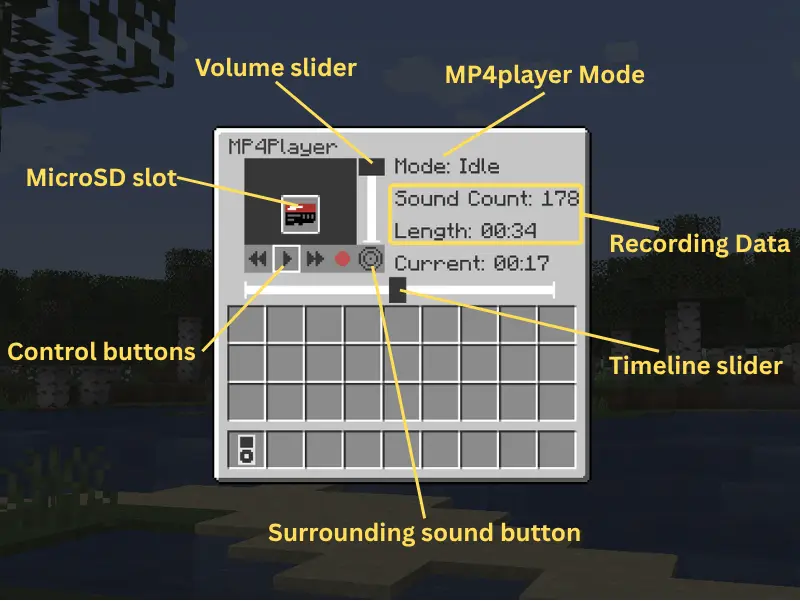
- Spacebar to pasue.
- Left/Right arrow to move the timeline slider.
How to Record:
Shift and right-click the MP4player to open the GUI. (You can also right-click to play/pause the recording.)
Insert the microSD into it.
Click the red button to start recording. (The old recording data in microSD will be removed.)
Now the sounds you heard should be recorded. (It is not allowed to take away the microSD from the MP4player while recording.)
Open the GUI again and click the square button to save the recording to the microSD.
How to play your recording from speaker:
Right-click the speaker with the microSD to insert.
The recording should loop automatically.
Give a redstone signal to the speaker to pause the loop.
Right-click the speaker with your hand to get back the microSD.
This mod is still under development.
More playable features are coming soon.
If you find any bugs, please tell me.
This is my first mod. Hope you enjoy it!
- Edition: Minecraft Java
- File type: .jar
- Minecraft version listed: 1.21.1
- How to install: Install the matching mod loader (Forge, Fabric or NeoForge) for your Minecraft version. → Download the .jar. → Put it in the .minecraft/mods folder and launch that loader profile.
- Where to get it: Opens on Modrinth — not every file is mirrored on our own servers.
Install steps are the general flow for this file type — How to install Minecraft Java mods & modpacks walks through it step by step.
- Ships as soundrecording-Fabric-1.21.1-0.0.3.jar — drop this file into the mods folder
- Download size: 114 KB
- Download link checked 23 Oct 2026 — working
These come from our own check of the pack file, not from the source page.