
Protect My Redstone
Java mod listed for Minecraft 1.21. Downloads from the MC Java Mods app on Android.
A singleplayer mod that detects active redstone ticks in loaded chunks and warns you before you log out to avoid breaking your farms/flying machines.
⬇ Download on Modrinth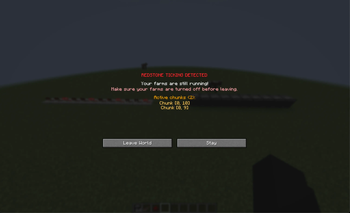
Protect My Redstone warns you before logging out of a singleplayer world while your farms are still running. Instead of accidentally breaking a farm or stopping your flying machines by closing the game, you'll get a warning screen showing which chunks have active redstone, allowing you to turn them off.
Features:
Detects active redstone in every loaded chunk, including chunks kept loaded by chunk loaders thousands of blocks away.
Warning screen lists the top active chunk coordinates so you know where your farms are running.
Configurable countdown timer before the Leave World button
unlocks.Configurable detection threshold so you can ignore small amounts of ambient redstone
Per-component toggles to choose exactly what counts toward the total:
Mod Currently Detects: Moving pistons,
Powered comparators
Powered repeaters
Powered observers
Active powered rails
Detector rails with a minecart on them
Active sculk sensors and calibrated sculk sensors
All settings are configurable in-game via ModMenu
- Edition: Minecraft Java
- File type: .jar
- Minecraft version listed: 1.21.11
- How to install: Install the matching mod loader (Forge, Fabric or NeoForge) for your Minecraft version. → Download the .jar. → Put it in the .minecraft/mods folder and launch that loader profile.
- Where to get it: Opens on Modrinth — not every file is mirrored on our own servers.
Install steps are the general flow for this file type — How to install Minecraft Java mods & modpacks walks through it step by step.
- Ships as protect-my-redstone-1.0.15.jar — drop this file into the mods folder
- Download size: 19 KB
- Download link checked 23 Oct 2026 — working
These come from our own check of the pack file, not from the source page.