
NoviceHelper
A handy utility mod with a "B" key menu for quick commands, coordinate copying, and automated tool durability alerts.
⬇ Download on Modrinth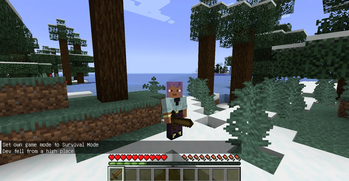
🛠️ Novice Helper PRO — The Ultimate Survival Companion
Novice Helper PRO is a lightweight yet powerful utility mod designed to make the Minecraft experience smoother for everyone. Whether you are a beginner learning the ropes or a pro looking for a faster way to manage your world, this mod provides a suite of essential tools at your fingertips. 🌟 Key Features
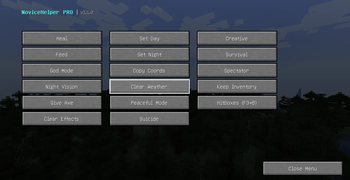
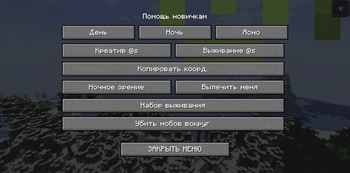
Quick Access Menu (Key: B): Open a dedicated, clean GUI to instantly control your environment.

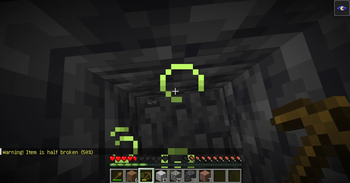
Smart Durability Alerts: Never lose a diamond tool again! The mod monitors your held item and sends chat warnings at 50%, 20%, 10%, and 5% durability.

Precision Countdown: When your tool is about to break, a real-time countdown appears for the final 5 uses right above your hotbar.

One-Click Utilities:

    Time & Weather: Change to day/night or clear the rain instantly.

    Gamemodes: Toggle between Creative, Survival, and Spectator modes with one click.

    World Rules: Quickly enable keepInventory or change difficulty.

Emergency Support: Instant buttons for Night Vision, Healing, and Feeding to save you in tight spots.

Coordinate Copy: Need to share your base location? Use the "Copy Coords" button to instantly save your X, Y, Z coordinates to your clipboard.

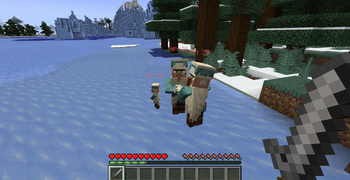
Entity HP & Hitboxes: Toggle entity hitboxes (F3+B) via the menu and see health points above mobs for better combat.
🌍 Multi-Language Support
The mod is fully localized and professionally translated into:
English (EN)

Russian (RU)

Latvian (LV)
🚀 How to Use
Open Menu: Press the B key (default) to open the Novice Helper interface.

Stay Safe: Watch the chat for color-coded warnings when your tools are low on durability.

Quick Start: Use the "Give Wooden Axe" button to jumpstart your survival adventure!
- Edition: Minecraft Java
- File type: .jar
- Minecraft version listed: 1.20.1
- How to install: Install the matching mod loader (Forge, Fabric or NeoForge) for your Minecraft version. → Download the .jar. → Put it in the .minecraft/mods folder and launch that loader profile.
- Where to get it: Opens on Modrinth — not every file is mirrored on our own servers.
Install steps are the general flow for this file type — How to install Minecraft Java mods & modpacks walks through it step by step.
- Ships as NoviceHelper-1.1.0.jar — drop this file into the mods folder
- Download size: 15 KB
- Download link checked 22 Aug 2026 — working
These come from our own check of the pack file, not from the source page.