
ModsJava
Area Selector V1
Java mod listed for Minecraft 1.21. Downloads from the MC Java Mods app on Android.
A client-side utility mod for visualizing large-scale farm and mining areas by generating customizable 3D highlight boxes between two diagonal coordinates.
⬇ Download on Modrinth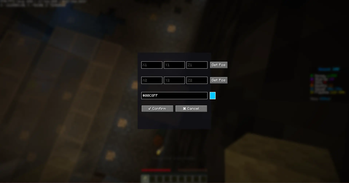
Initial Release: Area Selector V1
Welcome to the first release of Area Selector V1 for Minecraft 1.21.11!
This is the ultimate client-side tool designed to help players on Donut SMP (and everywhere else) effortlessly plan out large-scale farms and dig sites.
✨ Features
- Custom GUI Menu: Press
H(by default) to open the coordinate entry menu. - Auto-Fill Positions: Handy
[Get Pos]buttons allow you to instantly grab your exact current coordinates without typing a single number. - Partial Saving: Enter coordinates for Block 1, save, and walk over to Block 2 later. Your coordinates will wait for you!
- Custom Colors: Pick any highlight color you want by entering a standard hex code (e.g.,
#FF0000for red). - Smart 3D Rendering: The selected area is highlighted with a stunning translucent 3D box. The custom renderer specifically draws the inside faces, ensuring you can still see the highlight even when you are standing inside the box.
- Quick Toggle: Press
G(by default) to instantly turn the highlight box on or off. It also automatically turns on when you confirm a valid area! - Client-Side Only: This mod does not need to be installed on the server to work. You can use it anywhere.
🛠️ Technical Details
- Version: Fully updated and strictly mapped for Minecraft 1.21.11.
- Lightweight: Built in pure Java. You do not need the Fabric Kotlin Language adapter to use this mod.
- Dependencies: Only requires standard Fabric API.
Enjoy digging!
Quick facts
- Edition: Minecraft Java
- File type: .jar
- Minecraft version listed: 1.21.11
- How to install: Install the matching mod loader (Forge, Fabric or NeoForge) for your Minecraft version. → Download the .jar. → Put it in the .minecraft/mods folder and launch that loader profile.
- Where to get it: Opens on Modrinth — not every file is mirrored on our own servers.
Install steps are the general flow for this file type — How to install Minecraft Java mods & modpacks walks through it step by step.
File checked by MCModsHub
- Ships as Area selector V1-v1.21.11.jar — drop this file into the mods folder
- Download size: 428 KB
- Download link checked 23 Oct 2026 — working
These come from our own check of the pack file, not from the source page.