
Clean The Inventory
Java mod listed for Minecraft 1.21. Downloads from the MC Java Mods app on Android.
⬇ Download on Modrinth
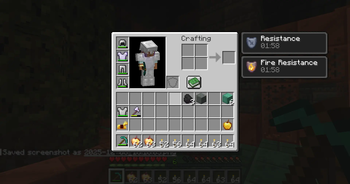
 Open the GUI with Z to manage and clean your inventory easily.
Press Z to open the Clean Inventory GUI and manage or remove unwanted items with ease.
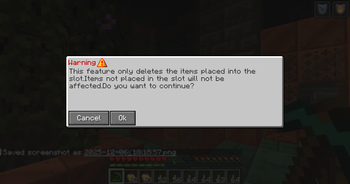
🔹 Destroy Feature
Deletes only the items placed in the selected inventory slots. Useful for removing specific items quickly without affecting the rest of your inventory.
🔹 AutoClean Feature
Deletes both the item in the selected slot and all identical items found anywhere in your inventory. Ideal for instantly removing all unwanted stacks of a specific item.
🔹 AutoMine Feature
Automatically deletes selected items while mining.
Use AutoMine Update to mark which items should be deleted.
Use AutoMine Reset to clear all items marked for deletion.
When AutoMine is ON, marked items are deleted automatically as you collect them.
Toggle AutoMine ON/OFF using the corresponding button in the GUI.
⚠️ Important Warning
These features permanently delete items. Incorrect use may result in accidental loss of valuable items. Please use AutoClean and AutoMine carefully.
- Edition: Minecraft Java
- File type: .jar
- Minecraft version listed: 1.21.4
- How to install: Install the matching mod loader (Forge, Fabric or NeoForge) for your Minecraft version. → Download the .jar. → Put it in the .minecraft/mods folder and launch that loader profile.
- Where to get it: Opens on Modrinth — not every file is mirrored on our own servers.
Install steps are the general flow for this file type — How to install Minecraft Java mods & modpacks walks through it step by step.
- Ships as Clean The Inventory-1.0.0-neoforge-1.21.4.jar — drop this file into the mods folder
- Download size: 260 KB
- Download link checked 24 Oct 2026 — working
These come from our own check of the pack file, not from the source page.