

TotemGuard is a lightweight client-side Fabric mod for Minecraft 1.21.4 that helps you manage your offhand slot and never accidentally place the wrong item there.
Features
Totem Lock
Blocks any non-totem item from being placed in your offhand slot. If you try to put something other than a Totem of Undying in your offhand, it will automatically be moved back to your inventory. You can also enable a sound alert and a chat notification whenever this happens, so you always know when the lock is active.
Item Highlighting
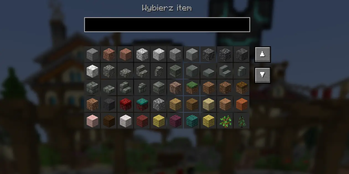
Highlight any item of your choice on your hotbar and offhand with a fully customizable color. This makes it easy to spot important items at a glance during intense gameplay. You can add multiple items to highlight at the same time, each with its own color.
In-game GUI
All features can be toggled on and off instantly through an easy-to-use in-game GUI, opened by pressing the R key. No need to restart the game or edit config files.
Language Support
The mod fully supports English and Polish. The language is automatically selected based on your Minecraft language settings.
Notes
- Client-side only, works on any server
- Supports both left and right main hand settings
- Designed for PvP and survival players who rely on their Totem of Undying
- Edition: Minecraft Java
- File type: .jar
- Minecraft version listed: 1.21.4
- How to install: Install the matching mod loader (Forge, Fabric or NeoForge) for your Minecraft version. → Download the .jar. → Put it in the .minecraft/mods folder and launch that loader profile.
- Where to get it: Opens on Modrinth — not every file is mirrored on our own servers.
Install steps are the general flow for this file type — How to install Minecraft Java mods & modpacks walks through it step by step.
- Ships as Totemguard - 1.0.jar — drop this file into the mods folder
- Download size: 29 KB
- Download link checked 23 Aug 2026 — working
These come from our own check of the pack file, not from the source page.