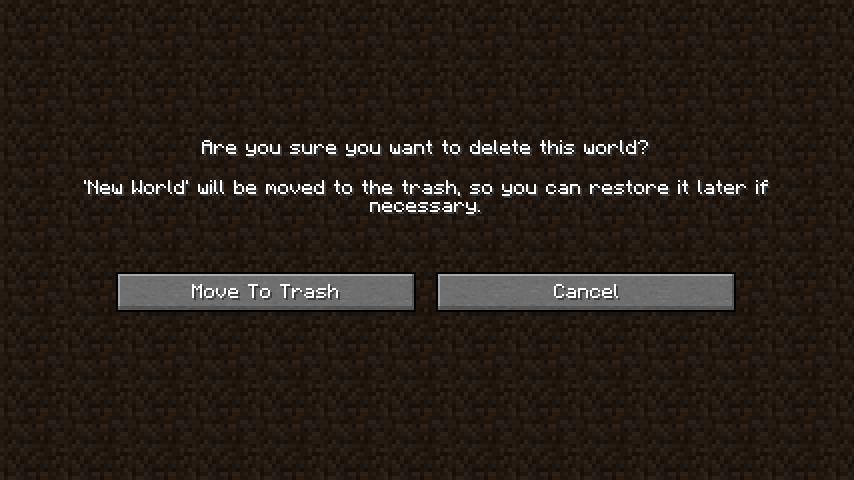
Deleted worlds are gone forever, right? Not anymore! Simply restore them from your recycle bin. Delete Worlds To Trash Mod makes it so that when deleting a Minecraft world it is moved to the recycle bin/trash instead of being nuked out of existence. Gives you a chance to reconsider, and after all you never know when it might come in handy later on.
Features:
- When you delete a world, it’s moved to your system’s trash/recycle bin instead of being permanently erased2.
- You can recover deleted worlds from the trash if you change your mind later.
- Adds a custom interface that clearly shows whether your system supports trash-based deletion.
Screenshots:
New screen for deleting worlds
Delete Worlds To Trash Mod Download Links
Quick facts
- Edition: Minecraft Java
- File type: .jar
- Minecraft version listed: 1.20.1
- How to install: Install the matching mod loader (Forge, Fabric or NeoForge) for your Minecraft version. → Download the .jar. → Put it in the .minecraft/mods folder and launch that loader profile.
- Where to get it: In MC Java Mods, or directly above on this page.
Install steps are the general flow for this file type — How to install Minecraft Java mods & modpacks walks through it step by step.
Verified by MCModsHub
- Downloads as 30199.mcaddon
- Download size: 33 KB
- Download link checked 23 Sept 2026 — working
- Mirrored on our own servers — the download does not depend on the original host
These come from our own check of the pack file, not from the source page.