
Stracciatella Modpack
Java modpack listed for Minecraft 1.21. Downloads from the MC Java Mods app on Android.
Aiming to provide a vanilla experience with more focus on Survival gameplay, visual enhancements, small QoL improvements and a more varied progression…
⬇ Download on Modrinth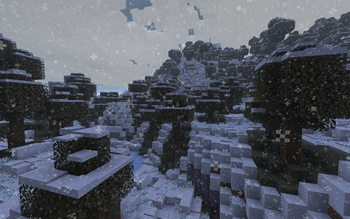

Stracciatella Modpack
contents
- overview
- changes from vanilla
- mod details + list
- modpack patchnotes
1. overview
minecraft version: 1.21.1, modpack version: 3.0.0
Feature complete. Do not expect new content. There might be minor additions, bugfixes or mod updates.
To keep your minecraft settings, worlds and various other stuff when upgrading from older versions (modrinth does not seem to do a good job at this sigh)
- download the modpack directly
- extract it
- copy the contents of the
modsandconfigfolders to your already existing instance, overwrite existing files.
Aiming to provide a vanilla experience with more focus on Survival gameplay, visual enhancements, small QoL improvements and a more varied progression tree. Uses vanilla as a base but with a bit more flavour (hence the name :3). Pretty much configured out of the box for the intended experience. detailed information below, comments/reasons in ().
There are some currently disabled mods in the mod folder, I still left them in there, see 3. mod details + list for details.
WARNING!!!
opening video settings with Controlify enabled crashes the game. Everything else works as intended. As far I can tell, it has something to do with Fabric's loading order, which Controlify completely reorders (and thus, breaks compatability with some mods). have not tested which mods need to be disabled for it to work. Controlify is disabled by default. enable at your own risk.
2. changes from vanilla
major gameplay changes
- added bundles: 64 items per bundle, interact with right-click, scroll to change the selected item.
- added seasons: 8 days = 1 week, 3 weeks = 1 month, 4 months = 1 year. I have not thoroughly tested how it affects vanilla survival gameplay, but it's probably fine lol. Snow falls in the autumn and winter and accumulates over multiple layers. better get those shovels ready.
- added heat and cold mechanics, there's equipment to stay cool/warm and various vanilla items that also help. works with the seasons mod (:D).
- added copper rails, they oxidise over time, but faster than gold when clean. can be stopped via wax, or cleaned manually. (also apparently minecarts can load chunks now, not tested.)
- full 3 degrees of freedom (roll/pitch/yaw) airplane/bird like controls when using an elytra. THE. BEST. MOD. fight me. (finally adds a good reason to get an elytra >:3c)
- same flight mechanics now also for swimming, disabled by default (is cool but not very practical)
- ingame voice chat (simple voice chat)
- compass now shows coordinates and facing direction. no more coordinates in the F3 menu (adds a reason for the compass to exist and immersion and makes early game navigation non-trivial)
- added new biomes that use all vanilla blocks for some more visual interest without introducing extra blocks or items that won't be compatible with the existing ones.
- added a instant polaroid like camera, bit janky with the ThirdPerson mod, but way too cool to remove just because of that.
SFX/VFX/UI
- added dynamic lighting. torches don't work underwater, but lanterns do!
- miniature shader pack. lightweight, close to vanilla, not looking out of place imo (feel free to change settings, use another, or disable all together. however, it's not the intended art direction anymore (something something death of the artist))
- added the third person player model to the first person view. also added some animations for typing/using a GUI/idle (immersion, honestly I think it adds so much to the vibes when a game does this :D (also shaders with shadows look wierd without))
- more realistic sound engine and footstep sounds. (feel free to change if it's too annoying)
- more particles, prettier water when it rains
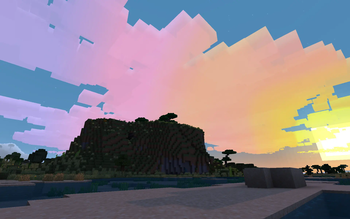
- prettier clouds, especially during the sunset/sunrise. clouds now adapt to the current weather (overcast when it rains).
- various misc visual improvements (connected textures, prettier snow, fog, leaves, etc. try it out to see for yourself.)
QoL changes/tweaks (Quality of Life)
- added gender (including blåhaj) :3
- crafting stairs now results in 6 stairs instead of 4. 2 slabs can be crafted back into blocks.
- player heads now visible in chat messages and command completions, sort of like a pfp.
- bonemeal now works on pretty much all plants.
- improved vanilla bows and arrows. burning arrows now ignite wood (>:D), infinity works with all arrow types, bows now show the correct arrows.
- spyglass can now zoom (scrollwheel), see mod menu for more options.
- can now properly read books in a lectern and read the titles of books stored in a chiseled bookshelf.
- change/mute the volume of any soundeffect in the game (accessible via the mod menu).
- added vertical slabs.
- changed librarian, less random and more focus on exploration.
- changed trident, now craftable.
- better banners, more utility (more patterns + ASCII characters, usable on beds and elytras, can now hang vertically).
- 4 more pot shapes, pots now dyeable and sherds can now be duplicated.
- you can now click through signs, no more fiddly chest storage nonsense.
- items do not despawn upon death, death location gets posted in the chat.
changed keybinds (just set whatever you want, those are the ones I use)
- "V" voice chat: show settings/GUI
- "O" shader: open shader settings
- "K" shader: disable/enable shader (enabled by default, no it will not burn down your computer or house)
- "M" misc: opens the map.
- "Shift" misc: sprint
- "Ctrl" misc: crouch (like it should be >:3c)
- "ESC -> "Mods" mods: opens mod menu, look around and tinker to your hearts content :D
- "F4" mods: toggles smoothed camera (combine with F1 for pretty views of pretty scenery)
- "F6" mods: toggle between third person model and default first person view.
- "F7" mods: also opens the mod menu
- "F10" mods: opens footstep configuration menu
misc
- changed crash sound effect (not the crash pipe anymore)
3. mod details + list
disabled mods
- Controlify: can result in crash: did work before but can't figure out why it now crashes the game. at least we have crash.wav :3c. considered not vital.
- Shoulder Surfing Reloaded: works as intended: is the default view upon starting the game, got annoying fast when restarting the game often
- Just Enough Items: works as intended: found it a little too distracing, you're more than welcome to enable it
- Distant Horizons: works as intended: did not work well with the seasons or shader, still there if you want to have the option
mod list
- see the up to date list on modrinth
setting up this modpack on a server
- copy the
modsandconfigdirectories to the server directory - start the server
- disable
Tinkerer's Smithing (tinkerers-smithing-*.jar)on the client(s) - disable
Fog Overrides (fogoverrides-*.jar)on the server - success! (game still crashes when leaving the server, but that's considered not vital for now, will look into this later.)
4. modpack patchnotes
see the built in modrinth patchnotes for up to date patchnotes.
version 1.2.4
- changed ingame vc mod from simple voice chat (has an option for global chat) to plasmo voice chat (only local chat)
version 1.2.3 (hotfix)
- removed moonlight-lib (deprecated, and crashes the game when joining a server)
- removed craftable saddles (i forgor)
- various performance improvements
version 1.2.2
- froze development, no new functionality will be added. already installed mods might be tweaked, disabled by default, swapped for other similiar mods, or removed entirely.
- tweaked elytras, now only loose durability when using fireworks, slightly slower now (not sure about this lol)
- added animations for typing, using a GUI, or idle
- added JEI, disabled by default
- added being able to click through signs (less annoying storage UX)
version 1.2.1
- disabled controlify, it's installed but disabled by default, enable at your own risk. (see warning above)
- messed with the movement abilities a bit too much, we'll just have to see if they need rebalancing.
- current implementation: wall running (shorter than default) and slides (6s cooldown, more mindful use, less spam), no dodge roll (could negate all fall damage)
- disabled over the shoulder F5 perspective by default, since it was kind of buggy
- better combat with axes (can use sword enchantments and no extra durability loss)
- can now drink water using your hands, however not very efficient or healthy lol
- more mob drops (always at least 1 item), consistent Looting Enchantment scaling (+1 item per level). (less RNG and to make up for mobs being harder to kill, less incentive to build giant mobgrinders when you get more items per mob now).
version 1.2.0
- improved banners (more patterns, usable on beds and elytras, can hang horizontally)
- added a couple improvements to elytra UI/UX
- more pot shapes, added recipe to clone sherds
- craftable totem of undying, elytra (both need a wither star (widening the progression tree)), craftable enchanted golden apple (what else are you gonna do with all that gold), craftable chainmail.
- added new F5 perspective (better third person view)
- removed vertical stairs (mod didn't work properly with glass panes, vertical slabs still exist and work nicely with glass panes).
- added sitting on slabs or stairs
- added additional pet mode (right click to cycle, see text on screen)
- added gender (blåhaj included) :3
version 1.1.2
- movement (titanfall2 like movement + trampoline like blocks)
- more varied world gen (cliff under a tree)
- trident improvements
- vertical slabs and stairs
- VR support (not tested)
- balanced librarian
- now with less annoying crash soundeffect :D
- Edition: Minecraft Java
- File type: .jar
- Minecraft version listed: 1.21.1
- How to install: Install the matching mod loader (Forge, Fabric or NeoForge) for your Minecraft version. → Download the .jar. → Put it in the .minecraft/mods folder and launch that loader profile.
- Where to get it: Opens on Modrinth — not every file is mirrored on our own servers.
Install steps are the general flow for this file type — How to install Minecraft Java mods & modpacks walks through it step by step.
- Downloads as stracciatella-v3.0.0.mrpack
- Download size: 2.2 MB
- Download link checked 16 Oct 2026 — working
These come from our own check of the pack file, not from the source page.