


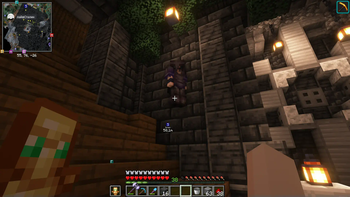


This modpack is designed to give the best experience in multiplayer game. With one click.
We hope that everyone will like our modpack and join our server :)
This modpack supports all basic features of Optifine texturepacks.
Because of these mods: -CIT Resewn -Entity Texture Features -Entity Model Features -Continuity
Improved visuals and game mechanics
Visuals:
- Falling leaves - Adds a neat little particle effect to leaf blocks.
- Iris Shaders - Shader pack loader.
- Particle Rain - Replaces weather with prettier particle effects.
- Better Ping Display - Adds a configurable numerical ping display to the player list.
Mechanics:
- Just Zoom - Zoom by pressing a hotkey.
- Click Through - Click through signs and item frames.
- RP Renames - See what CIT and CEM Renames are in your Resource Packs!
- AutoLogin - Automatically registers and logs in.
- Auto Reconnect - AutoReconnect mod.
- Chat Patches - A Minecraft Fabric client-side mod that touches up a few aspects of Minecraft's mundane chat, with as much configurability as possible!
- Continue Button - Continue the last world or server you played from the title screen.
- Shulker Box Tooltip - View the contents of shulker boxes from your inventory.
- BetterF3 - Mod that replaces Minecraft's original debug HUD with a highly customizable, more human-readable HUD.
Mods to optimize game
-Indium -Sodium -Dynamic FPS -Entity Culling
ReplayMod
ReplayMod is here to give you an ability to see what was once there.
Voice Chat
Simple Voice Chat - A working voice chat in Minecraft!
Litematica
Litematica - A client-side schematic mod with extra features for creative mode work
View your world from new perspectives
-Xaero's Minimap -Xaero's World Map
Ability to show your emotions in the game
Emotecraft - Create your own emotes in Minecraft.
There are 300+ animations in modpack
SP-Emotes are present in modpack, thanks to [Milyan]~~~~(https://www.youtube.com/@m1lyan) for the emotes.
- Edition: Minecraft Java
- File type: .jar
- Minecraft version listed: 1.21.9
- How to install: Install the matching mod loader (Forge, Fabric or NeoForge) for your Minecraft version. → Download the .jar. → Put it in the .minecraft/mods folder and launch that loader profile.
- Where to get it: Opens on Modrinth — not every file is mirrored on our own servers.
Install steps are the general flow for this file type — How to install Minecraft Java mods & modpacks walks through it step by step.
- Downloads as ETERNITYMINE - The modpack 2.0.0-stable.mrpack
- Download size: 43.6 MB
- Download link checked 10 Sept 2026 — working
These come from our own check of the pack file, not from the source page.