
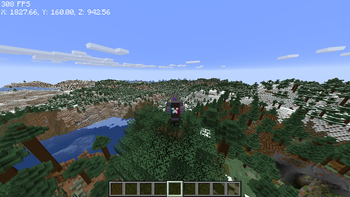
A Minecraft modpack focuses higher chunk rendering while increasing FPS.
!! The mod is still in development. Best performance can be achieved with Nvidia graphic cards !!
OPTIMIZATIONS Highly Optimized uses Sodium and other optimization mods in order to boost FPS in basic mode. However the modpack's performance is far more better while using Nvidium. Saving further chunks can be done with Distant Horizons mod so modpack is designed to use both of the mods together. I listed diffrent type of usage for the modpack, depends on your preferences.
Spoiler1) Just Sodium Standard Sodium performance with other bug fixes and FPS optimizations. Better than vanilla, but not a big difference between Sodium standalone.
2) Nvidium Nvidium can be used if you have Nvidia graphic card. If you have it, using the modpack with Nvidium is recommended for highest FPS, more chunks and faster chunk loadings. On the downside, you can't use Iris shades or Nvidium disables itself.
3) Distant Horizons Just Distant Horizons can be used with supported shaders (can be found in internet) but you should have a good PC anyway if you want to use shaders with high FPS. You can use Distant Horizons itself (which is optimized in this modpack).
4) Distant Horizons with Nvidium The main goal of the modpack is using Nvidium and Distant Horizons together with the other optimization mods so while rendering fast and far. FPS is also pretty**** good if both of the mods modified for better performance.
OTHER FEATURES Highly Optimized has ETF and EMF so you can use texture packs that has changes can be solved with Optifine (for example Fresh Animations)
Highly Optimized has Iris so you can use shaders with Fabric Mod Loader and Distant Horizons (if supported)
Highly Optimized has Zoomify mod which helps you zoom in with a key. You will need more if you use Nvidium and/or Distant Horizons mod.
- There are more mods that improves gameplay while keeping vanilla style. Also works perfect with vanilla servers. You can check all the mods in mod menu.
- Edition: Minecraft Java
- File type: .jar
- Minecraft version listed: 1.21
- How to install: Install the matching mod loader (Forge, Fabric or NeoForge) for your Minecraft version. → Download the .jar. → Put it in the .minecraft/mods folder and launch that loader profile.
- Where to get it: Opens on Modrinth — not every file is mirrored on our own servers.
Install steps are the general flow for this file type — How to install Minecraft Java mods & modpacks walks through it step by step.
- Downloads as Vecturnn's Highly Optimized 1.0.0.mrpack
- Download size: 64 KB
- Download link checked 11 Sept 2026 — working
These come from our own check of the pack file, not from the source page.