
Ryzen SMP Official Modpack
Java modpack listed for Minecraft 1.21. Downloads from the MC Java Mods app on Android.
A bunch of Fabric mods to make your game run smoother and make the best experience of Ryzen SMP, or any other survival anarchy server!
⬇ Download on ModrinthA bundle of mods to make your game run smoother and make the best experience of Ryzen SMP, or any other Survival/anarchy server.
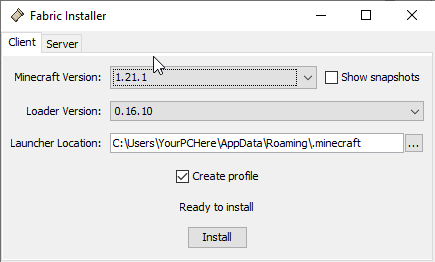
Installing instructions: Go to https://fabricmc.net and download the installer. Run the installer and under versions scroll down to 1.21.1. Make sure "create profile" is checked, then click Install. Then, unzip the modpack. Go into your .minecraft folder (also accessible through the resource pack folder -> go up 1 folder in the file directory) and find your mods folder. Make sure it is either empty or only has compatible mods. Go into the unzipped modpack folder and place all the .jar files into your mods folder. Launch Minecraft Launcher and your selected versions should say "fabric 1.21.1". click play and your game will start with all your mods!
<__Mods List__>
Quality of life: AppleSkin, Capes, Chat Heads, Concentration, Fullbright, Jade, LambDynamicLights, Recursive Resources, Shulker Box Tooltip, Simple Voice Chat, Slotted Armor HUD, Unlock All Recipes, Zoomify
Optimization: Clumps, Debugify, FerriteCore, ImmediatelyFast, Iris, Lithium, ModelFix, ModernFix, Mod Menu, More Culling, Noisium, Reese's Sodium Options, Sodium Extra, Sodium
Libraries (required to run some mods): Architectury, Cicada, Cloth Config, Fabric API, Fabric Language Kotlin, Placeholder API, Silk, Yet Another Config Lib
All credits to the original makers of these mods, which can all be found on Modrinth.
Note: Even if you don't use the modpack, you will have to use the exact same version of Simple Voice Chat (2.5.28) in order to be able to talk to other members with the modpack, as there is currently a glitch where you cannot talk between different Simple Voice Chat versions.
- Edition: Minecraft Java
- File type: .jar
- Minecraft version listed: 1.21.1
- How to install: Install the matching mod loader (Forge, Fabric or NeoForge) for your Minecraft version. → Download the .jar. → Put it in the .minecraft/mods folder and launch that loader profile.
- Where to get it: Opens on Modrinth — not every file is mirrored on our own servers.
Install steps are the general flow for this file type — How to install Minecraft Java mods & modpacks walks through it step by step.
- Downloads as Ryzen SMP Official Modpack 1.0.mrpack
- Download size: 6 KB
- Download link checked 21 Oct 2026 — working
These come from our own check of the pack file, not from the source page.