ModpacksJava
New Optimizations
Java modpack listed for Minecraft 1.21. Downloads from the MC Java Mods app on Android.
⬇ Download on Modrinth🌿 New Optimizations
New Optimizations is a lightweight, client-side modpack focused on squeezing out the best performance from your game while adding just a touch of polish through quality-of-life.
💡 What’s Inside:
- ⚙️ Optimization Mods – Includes Sodium, Lithium, ImmediatelyFast and alot more for maximum FPS and reduced lag.
- 🎨 Quality Of Life Enhancements – Some upgrades like BetterF3 and Inventory Essentials make the game easier to navigate in some places.
- 🧼 Lightweight & Vanilla-Friendly – Safe to use on vanilla servers, with no major gameplay overhauls.
🚀 Why Choose New Optimizations?
- Boosts FPS on low to mid-end systems
- Keeps Minecraft looking and feeling vanilla
- Adds smart improvements for everyday gameplay
Performance
- Tested with GTX 1660 Super + Ryzen 5 3600
- New Optimizations is in beta, so the preformence will not be much better than vanilla until i find better mods, but it still has a large preformence boost from vanilla
Without New Optimizations
390 - 430 FPS
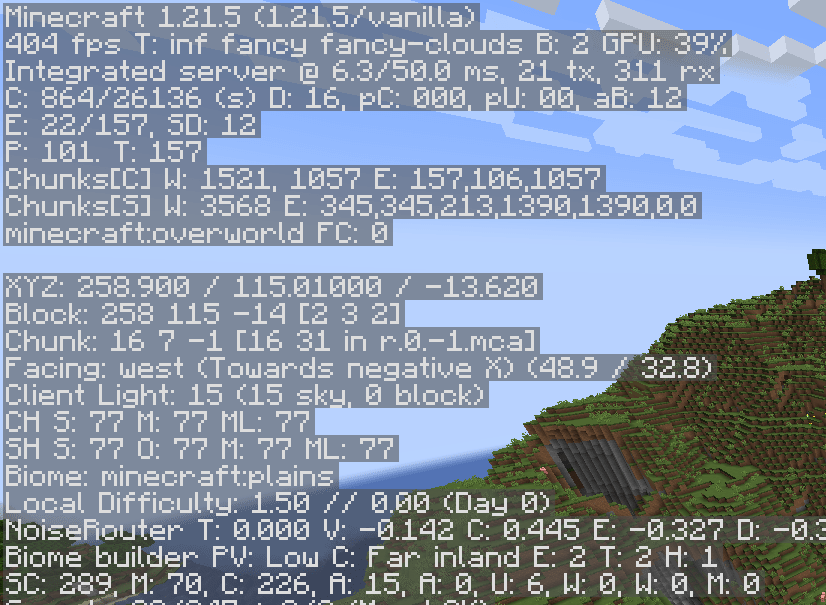
With New Optimizations
410 - 505 FPS

Run smoother. Stay vanilla.
Quick facts
- Edition: Minecraft Java
- File type: .jar
- Minecraft version listed: 1.21.5
- How to install: Install the matching mod loader (Forge, Fabric or NeoForge) for your Minecraft version. → Download the .jar. → Put it in the .minecraft/mods folder and launch that loader profile.
- Where to get it: Opens on Modrinth — not every file is mirrored on our own servers.
Install steps are the general flow for this file type — How to install Minecraft Java mods & modpacks walks through it step by step.
File checked by MCModsHub
- Downloads as New Optimizations 1.0.0.mrpack
- Download size: 19 KB
- Download link checked 22 Oct 2026 — working
These come from our own check of the pack file, not from the source page.