
Clean Redstone - extra components
Java resource pack listed for Minecraft 1.15–1.21. Downloads from the MC Java Mods app on Android.
⬇ Download on Modrinth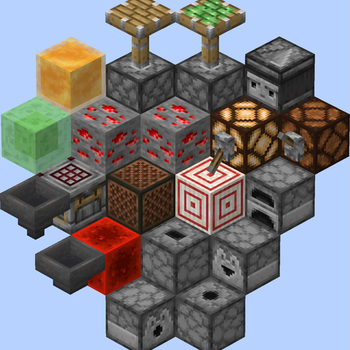
If you want to publish a project containing my work, please mention my username "Vunyx" somewhere. Also, a link to my project would be much appreciated.
Description
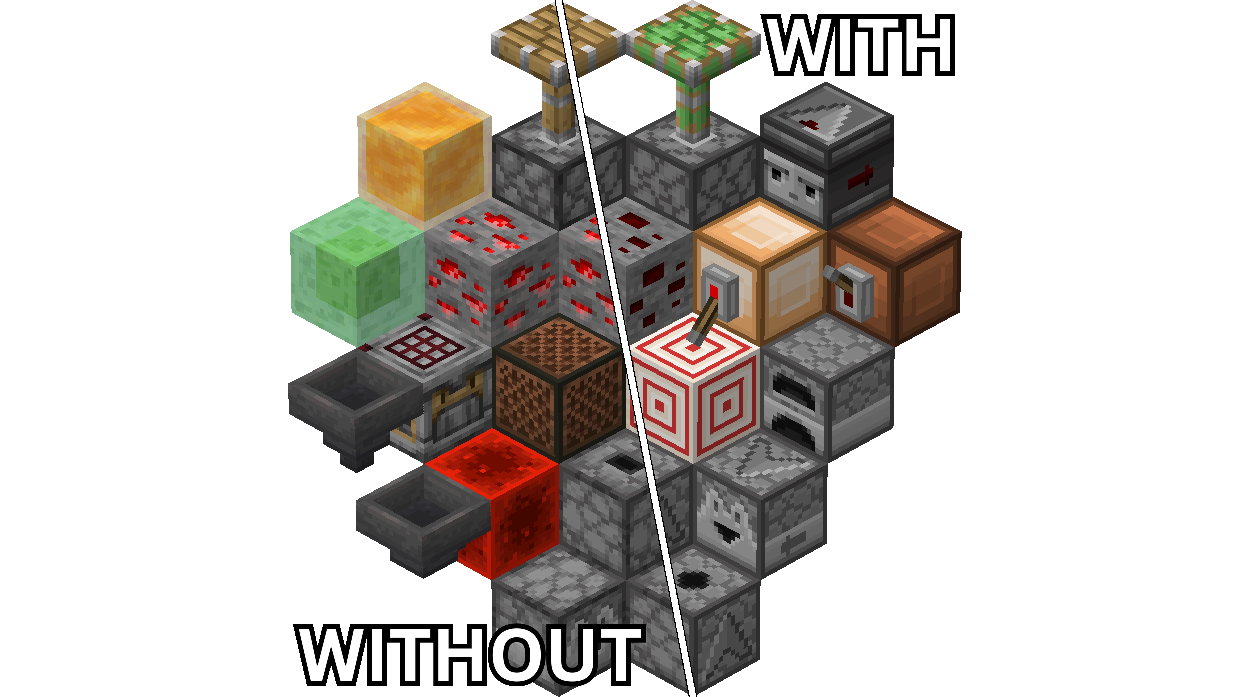
This resource pack gives a clean look to more redstone redstone components. It is intended to be used in combination with my other pack Clean Redstone - main components.
The affected blocks are:
- redstone ore
- redstone lamp
- redstone block
- target block
- slime block
- honey block
- note block
- observer
- dispenser
- dropper
- crafter
- hopper
- lever
- piston
- sticky piston
- furnace
If you also want the rails to follow the same clean look, you can download my other pack Clean Redstone - rails and minecarts.
How to install
After downloading the resource pack, go to options -> resource packs and click the Open Pack Folder button, or open %appdata%\.minecraft\resourcepacks directly. Put the resource pack in this folder. It should then show up under Available. Click the arrow to switch it to the Selected tab and click Done. That's it, the pack should now be installed properly.
- Edition: Minecraft Java
- File type: .zip (resource pack)
- Minecraft versions listed: 1.15, 1.15.1, 1.15.2
- How to install: Download the .zip resource pack — do not unzip it. → Put it in .minecraft/resourcepacks. → Enable it in Options → Resource Packs.
- Where to get it: Opens on Modrinth — not every file is mirrored on our own servers.
Install steps are the general flow for this file type — How to install Minecraft Java resource packs walks through it step by step.
- Downloads as CleanRedstone - extra components.zip
- Download size: 152 KB
- Download link checked 1 Nov 2026 — working
These come from our own check of the pack file, not from the source page.