
Biome Color Removed
Java resource pack listed for Minecraft 1.21–26.x. Downloads from the MC Java Mods app on Android.
I don't know my version or loader
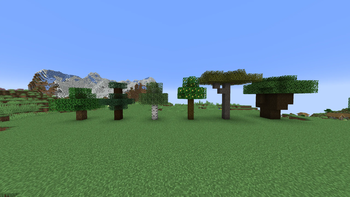
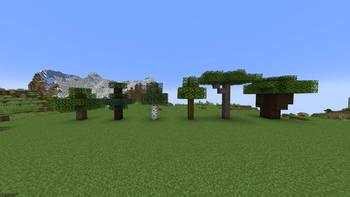
Why Does This Exist?:
This pack is intended to be used by resource pack creators who wish to remove biome colors from various blocks.
I do not intend for this pack to be used to actually play Minecraft with it enabled, however there is a version with textures included to make the previously biome colored blocks green again, to make it more friendly on the eyes.
Feel free to use the files in your own resource pack, credit is appreciated but not required.
Biome color currently removed:
acacia leaves
birch leaves
dark oak leaves
fern
short grass
grass block
jungle leaves
large fern
lily pad
mangrove leaves
oak leaves
potted fern
spruce leaves
sugar cane
tall grass
vine
bush
leaf litter
biome color removed with Optifine:
water
flowing water
Optifine only version removes all biome colors without using models
- Edition: Minecraft Java
- File type: .zip (resource pack)
- Minecraft versions listed: 1.21.9, 1.21.10, 1.21.11
- How to install: Download the .zip resource pack — do not unzip it. → Put it in .minecraft/resourcepacks. → Enable it in Options → Resource Packs.
- Where to get it: Opens on Modrinth — not every file is mirrored on our own servers.
Install steps are the general flow for this file type — How to install Minecraft Java resource packs walks through it step by step.
- Downloads as Biome Color Removed.zip
- Download size: 14 KB
- Download link checked 11 Oct 2026 — working
These come from our own check of the pack file, not from the source page.