
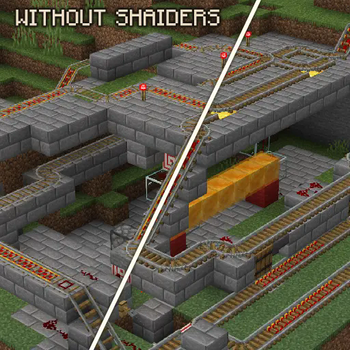
Two 3D_rails
About:
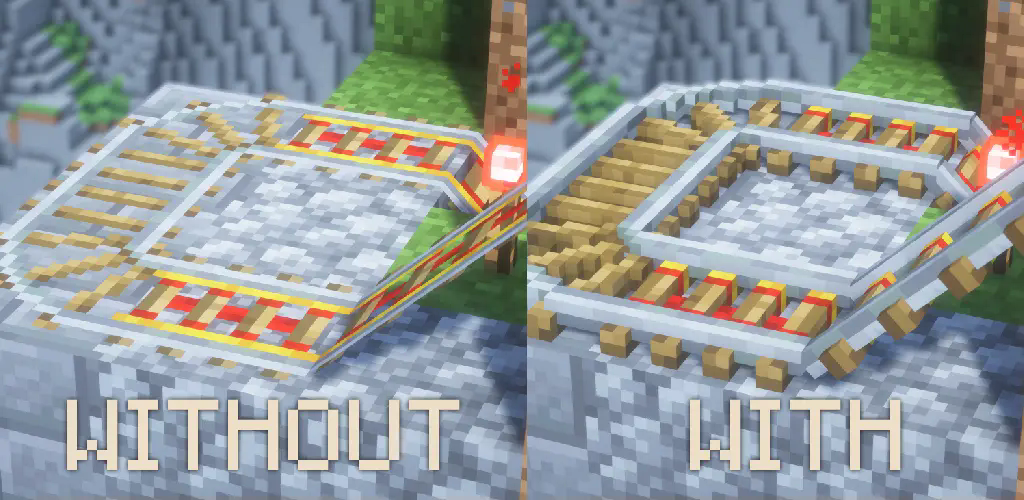
This resource pack transforms your default 2D sprite rails into detailed 3D models while preserving the classic Vanilla texture. As shown in the images, rails now have a more realistic look with added depth and structure, enhancing your Minecraft experience without changing the original style.
Page description:
- About
- Screenshots
- Installation guide
- End
Screenshots:

Installation:
Launch your version of minecraft / (or while playing press "Esc" button)
Click on "Option" menu.
Click on "Resource pack"
This is list of all your pack, left column that is not in use - right column that is currently used
Click on "Open Pack Folder"
Drag the resource pack into the explorer window that just appeared.
Go back to Minecraft. (In left column will appear new resource pack)
Move resource pack to the right column and click "Done"
Enjoy
End:
Thank you for downloading my resource pack, I will be happy to hear your feedback or/and any suggestion or issue that might be found. Thanks, there are a lot of 2D sprites in Minecraft that I would like to change!
- Edition: Minecraft Java
- File type: .zip (resource pack)
- Minecraft version listed: 1.21.5
- How to install: Download the .zip resource pack — do not unzip it. → Put it in .minecraft/resourcepacks. → Enable it in Options → Resource Packs.
- Where to get it: Opens on Modrinth — not every file is mirrored on our own servers.
Install steps are the general flow for this file type — How to install Minecraft Java resource packs walks through it step by step.
- Downloads as twoThreeD_Rails_1.21.5.zip
- Download size: 53 KB
- Download link checked 31 Aug 2026 — working
These come from our own check of the pack file, not from the source page.