
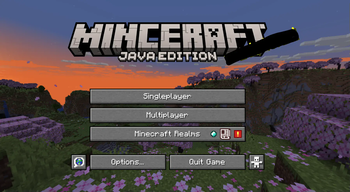
The title says basicly everything. Just install the pack, and enable it, then NO MORE SPLASH TEXT!!! (Also try out my mod too, it is free and fun https://modrinth.com/mod/xtra-stuf )
Quick facts
- Edition: Minecraft Java
- File type: .zip (resource pack)
- Minecraft versions listed: 1.19, 1.19.1, 1.19.2
- How to install: Download the .zip resource pack — do not unzip it. → Put it in .minecraft/resourcepacks. → Enable it in Options → Resource Packs.
- Where to get it: Opens on Modrinth — not every file is mirrored on our own servers.
Install steps are the general flow for this file type — How to install Minecraft Java resource packs walks through it step by step.
Verified by MCModsHub
- Downloads as no_more_splash_text-1.0.0-resourcepack-1.21.4.zip
- Download size: 6 KB
- Download link checked 31 Aug 2026 — working
These come from our own check of the pack file, not from the source page.