
Evol's 3D Lanterns and Chains Enhanced
Evol's 3D Chains & Lanterns, a resource pack designed to bring a new dimension to your Minecraft world! This pack enhances the visual experience of…
I don't know my version or loader
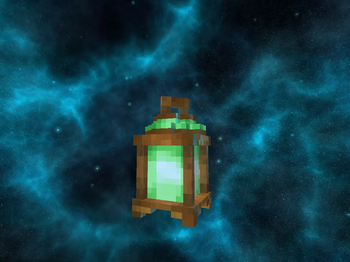


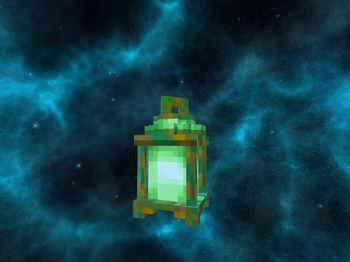


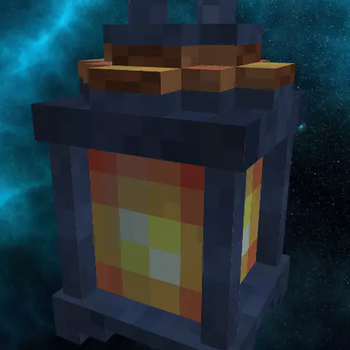
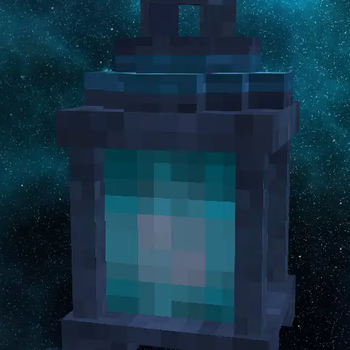
 Evol's 3D Chains & Lanterns Resource Pack
Welcome to Evol's 3D Chains & Lanterns, a resource pack designed to bring a new dimension to your Minecraft world! This pack enhances the visual experience of chains, lanterns, and soul lanterns by making them completely 3D and providing updated texture animations, all in a crisp 32x32 resolution.
Features
- Fully 3D Chains:
- Say goodbye to flat chains! Our pack transforms them into beautiful, three-dimensional models, adding depth and realism to your builds.
- 3D Lanterns & Soul Lanterns:
- Experience your light sources like never before. Both regular lanterns and soul lanterns are now fully 3D fitting seamlessly into any environment.
- Animated Textures:
- Enjoy subtle yet captivating animated textures that breathe life into these common decorative blocks.
- 32x32 Resolution:
- High-quality textures without being overly demanding, providing a perfect balance between performance and visual fidelity.
- No Requirements:
- This resource pack works with vanilla Minecraft, no mods or external loaders are necessary.
- Shader Friendly:
- While not required, Evol's 3D Chains & Lanterns includes PBR mapping for all textures, and truly shines when paired with your favorite shaders, further enhancing the dynamic lighting and visual effects.
Installation
- Download the resource pack file.
- Open Minecraft and navigate to "Options" -> "Resource Packs" -> "Open Pack Folder".
- Drag and Drop the downloaded
.zipfile into the resource packs folder. - Activate the resource pack from within Minecraft by moving it from the "Available Resource Packs" to the "Selected Resource Packs" column. Make sure it is above any other packs that might modify chains or lanterns.
- Enjoy!
Compatibility
This resource pack is compatible with Minecraft Java Edition 1.16.x and newer versions. As it only modifies models and textures for specific blocks, it should be compatible with most other resource packs, provided it is placed higher in the resource pack order.
Feedback
If you encounter any bugs, have suggestions, or just want to share your amazing builds using this pack, please feel free to reach out through [mention your preferred contact method here, e.g., a specific forum thread, Discord, GitHub issues]. Your feedback helps make this pack even better!
Changelog
Version 1.0.0
- Initial release of Evol's 3D Chains & Lanterns.
- Implemented full 3D models for all chain segments.
- Implemented full 3D models for regular lanterns.
- Implemented full 3D models for soul lanterns.
- Added animated textures for chains.
- Added animated textures for lanterns.
- Added animated textures for soul lanterns.
- All textures updated to 32x32 resolution.
Version 1.01 (PBR Update)
- All textures include PBR Textures for use with shaders now.
Thank you for downloading and using Evol's 3D Chains & Lanterns! We hope you enjoy the enhanced visual experience in your Minecraft adventures.
- Edition: Minecraft Java
- File type: .zip (resource pack)
- Minecraft versions listed: 1.20, 1.20.1, 1.21.1
- How to install: Download the .zip resource pack — do not unzip it. → Put it in .minecraft/resourcepacks. → Enable it in Options → Resource Packs.
- Where to get it: Opens on Modrinth — not every file is mirrored on our own servers.
Install steps are the general flow for this file type — How to install Minecraft Java resource packs walks through it step by step.
- Downloads as Evols_3D_Lanterns_and_Chains_v1.13.zip
- Download size: 240 KB
- Download link checked 31 Aug 2026 — working
These come from our own check of the pack file, not from the source page.