
Etherden
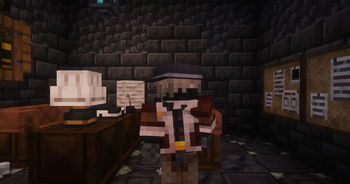
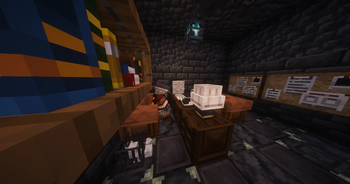
Have you wanted to look at a high-quality 3D resource pack for a long time? Get it! There are more than 1200+ things in this resource pack, and you can…
I don't know my version or loader
Etherden
Description / Описание
(en) Have you been looking for a high-quality and well-developed 3D resource pack for a long time? You have found what you need! This resource pack contains more than 1200+ models on different topics while maintaining the Minecraft style. Diversify your Minecraft experience with this wonderful resource pack! This resource pack contains many decorations, hats and other models that improve the gameplay. This resource pack will perform best when playing with friends or on servers. Was taken as a basis KSEPSP
For the resource pack to work, it is required OptiFine or CIT Resewn
A list with renames: List of renames
(ru) Давно искали качественный и проработанный 3D-ресурспак? Вы нашли то, что нужно! В этом ресурспаке более 1200+ моделей на разные тематики с сохранением стиля майнкрафта. Разнообразьте свой опыт игры в майнкрафт с этим замечательным ресурспаком! В данном ресурспаке много декораций, шапок и других моделей улучшающие игровой процесс. Лучше всего данный ресурспак будет показывать себя при игре с друзьями или на серверах. За основу был взят KSEPSP
Для работы ресурспака требуется OptiFine или CIT Resewn
Список с переименованиями: Список переименований
Installation / Установка
(en)
- We have Archive with Resource Pack.
- Drop this Archive into .minecraft\resourcepacks
- Go to Minecraft
- Go to Settings -> Resource Packs
- We see our Resource Pack and turn it on.
(ru)
- У нас есть Архив с Ресурспаком.
- Кидаем этот Архив в .minecraft\resourcepacks
- Заходим в Майнкрафт
- Заходим в Настройки -> Ресурспаки
- Видим наш Ресурспак и включаем его.
- Edition: Minecraft Java
- File type: .zip (resource pack)
- Minecraft versions listed: 1.16.4, 1.16.5, 1.17
- How to install: Download the .zip resource pack — do not unzip it. → Put it in .minecraft/resourcepacks. → Enable it in Options → Resource Packs.
- Where to get it: Opens on Modrinth — not every file is mirrored on our own servers.
Install steps are the general flow for this file type — How to install Minecraft Java resource packs walks through it step by step.
- Downloads as Etherden-8.0.4.4.zip
- Download size: 13.1 MB
- Download link checked 31 Aug 2026 — working
These come from our own check of the pack file, not from the source page.