
Fast Better Grass: Untinted Edition
A micro-pack that removes biome coloring from Fast Better Grass so it matches classic/alpha, fixed-palette foliage packs.
⬇ Download on Modrinth
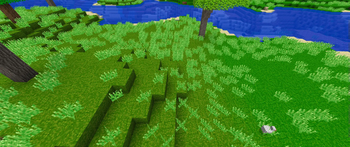
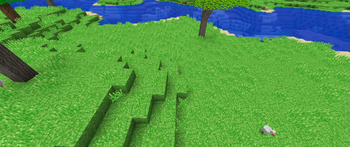
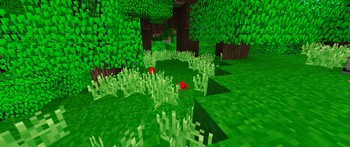
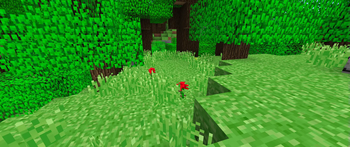
Fast Better Grass – Untinted Edition
A micro-pack that removes biome coloring from Fast Better Grass so it matches classic/alpha, fixed-palette foliage packs.
🌿 Why This Exists
Packs like Golden Days + Alpha Addon and PACP + Beta Addon + Alpha Addon revive the bright, always-green look of Minecraft Classic/Alpha.
Fast Better Grass keeps terrain edges tidy, but its full grass-blocks still pick up biome tints—so plains, jungles, swamps, etc. show jarring color shifts.
This add-on keeps Fast Better Grass’s sides overlay while locking the grass color to the grass_block_top.png texture, giving you seamless greenery everywhere.
🗒️ What’s Inside
The only file touched is:
assets/minecraft/models/block/grass_block.json
It simply drops every tintindex: 0, disabling biome tint:
{
"parent": "block/block",
"textures": {
"particle": "block/dirt",
"bottom": "block/dirt",
"top": "block/grass_block_top"
},
"elements": [
{
"from": [0, 0, 0],
"to": [16, 16, 16],
"faces": {
"down": { "uv": [0,0,16,16], "texture": "#bottom", "cullface": "down" },
"up": { "uv": [0,0,16,16], "texture": "#top", "cullface": "up", "tintindex": 0 },
"north": { "uv": [0,0,16,16], "texture": "#top", "cullface": "north", "tintindex": 0 },
"south": { "uv": [0,0,16,16], "texture": "#top", "cullface": "south", "tintindex": 0 },
"west": { "uv": [0,0,16,16], "texture": "#top", "cullface": "west", "tintindex": 0 },
"east": { "uv": [0,0,16,16], "texture": "#top", "cullface": "east", "tintindex": 0 }
}
}
]
}
👌 Untinted Edition{
"parent": "block/block",
"textures": {
"particle": "block/dirt",
"bottom": "block/dirt",
"top": "block/grass_block_top"
},
"elements": [
{
"from": [0, 0, 0],
"to": [16, 16, 16],
"faces": {
"down": { "uv": [0,0,16,16], "texture": "#bottom", "cullface": "down" },
"up": { "uv": [0,0,16,16], "texture": "#top", "cullface": "up" },
"north": { "uv": [0,0,16,16], "texture": "#top", "cullface": "north" },
"south": { "uv": [0,0,16,16], "texture": "#top", "cullface": "south" },
"west": { "uv": [0,0,16,16], "texture": "#top", "cullface": "west" },
"east": { "uv": [0,0,16,16], "texture": "#top", "cullface": "east" }
}
}
]
}
Load order recommendation:
⬆️ Fast Better Grass – Untinted Edition
➡️ Fast Better Grass (original)
⬇️ Golden Days + Alpha Addon / PACP + Beta Addon + Alpha Addon
✅ Compatibility
| Feature | Status |
|---|---|
| Minecraft 1.20-1.21.5 (Java) | ✔ Tested, no mods needed |
| Fast Better Grass 1.21.5 | ✔ Tested, should also work for newer versions |
| Other resourcepacks | ✔ Works with any colored grass_block_top.png (if gray, it will not work) |
🤝 Credits
- Fast Better Grass by robotkoer – base pack and overlay logic.
- Untinted tweak by HandLock_
- Distributed under the same license as the original (MIT).
“Sometimes the best color… is the one that never changes.”
- Edition: Minecraft Java
- File type: .zip (resource pack)
- Minecraft versions listed: 1.20, 1.20.1, 1.20.2
- How to install: Download the .zip resource pack — do not unzip it. → Put it in .minecraft/resourcepacks. → Enable it in Options → Resource Packs.
- Where to get it: Opens on Modrinth — not every file is mirrored on our own servers.
Install steps are the general flow for this file type — How to install Minecraft Java resource packs walks through it step by step.
- Downloads as fast-better-grass-untinted-edition-1.0.0+1.20-1.21.5.zip
- Download size: 16 KB
- Download link checked 31 Aug 2026 — working
These come from our own check of the pack file, not from the source page.